Manage Hose Locations
StationOne lets you track exactly where each hose is at any time: loaded on a vehicle, tagged to a specific storage location at the unit (a rack, tower, or storage room), or held in a hose cache. Every move — onto a vehicle, off a vehicle, or between storage locations — is recorded so you always have an accurate location and a full audit trail.
Prerequisites
Section titled “Prerequisites”- Brigade admin, brigade user, or organisation admin role
- Hoses already created in your hose register (see Create a Hose)
- Hoses must be in-service and not held in a cache location to be moved to a vehicle or storage location
- Hose Tracking enabled for your unit if you want to tag specific at-unit storage locations (see below) — vehicle assignment works either way
Enabling Hose Tracking and Storage Locations
Section titled “Enabling Hose Tracking and Storage Locations”Hose Tracking adds a Current Location column and vehicle-allocation summary to the Hose Register, and lets you tag at-unit hoses with a specific storage location rather than just “at the unit.”
- Click Hoses in the main navigation
- Click the settings (gear) icon to open Hose Settings
- Toggle Hose tracking on
- Under Storage Locations, enter a comma-separated list of the physical locations hoses can be kept at your unit (e.g.
Hose Rack 1, Storage Room B, Tower) - Click Save Settings
Optionally, toggle Allow public location updates so visitors on your brigade’s public hoses page can update where an at-unit hose is stored without logging in — see Public Hose Interface for details.
Changing a Hose’s Location
Section titled “Changing a Hose’s Location”1. Navigate to the Hose
Section titled “1. Navigate to the Hose”- Log in to StationOne
- Click Hoses in the main navigation
- Find the hose you want to move and click its reference number to open the detail page
2. Open Change Location
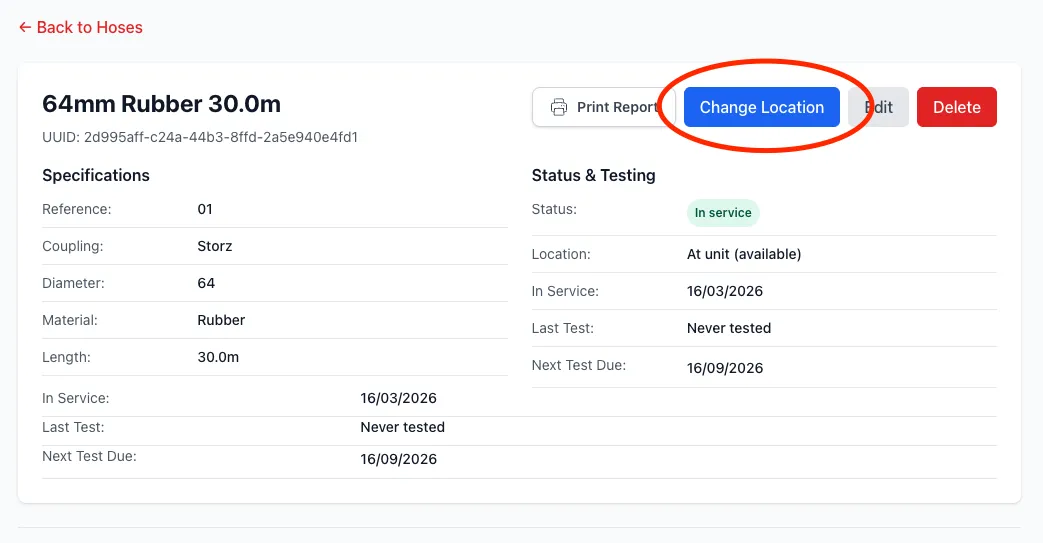
Section titled “2. Open Change Location”- On the hose detail page, click Change Location
3. Move to Vehicle or Unit
Section titled “3. Move to Vehicle or Unit”- In the Move to Vehicle or Unit section, pick a destination from the dropdown — a vehicle, or (if Hose Tracking is enabled) one of your configured storage locations
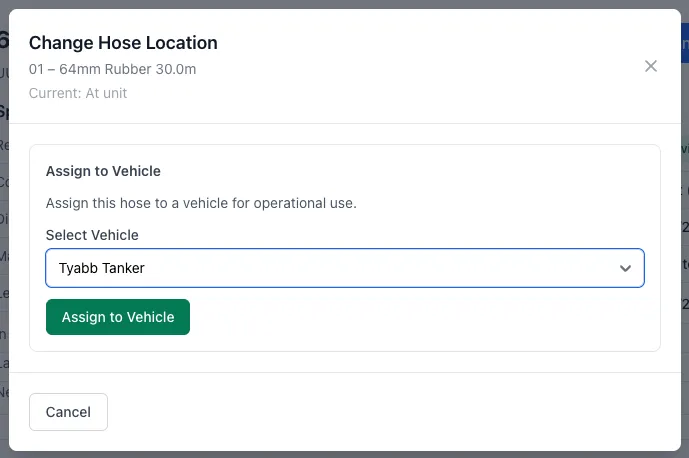
- If the hose is currently on a vehicle, you’ll also be asked whether it was used operationally (flowed water) — this is required before the move can be saved, and an optional reason/condition note can be added
- Click Save Location
The hose’s location updates immediately. A transfer record is automatically created for the audit trail.
If your unit has hose caches configured, the same modal also offers a Swap to Cache option for exchanging an in-service hose for a replacement — see Hose Swapping for that workflow.
Managing Hoses from the Vehicle Page
Section titled “Managing Hoses from the Vehicle Page”The vehicle’s Hoses tab gives you a full view of what’s loaded, what’s required, and what’s available at the unit — all hose management for the vehicle happens directly on this tab, there’s no separate management page.
1. Navigate to the Vehicle
Section titled “1. Navigate to the Vehicle”- Click Vehicles in the main navigation
- Select the vehicle
2. Open the Hoses Tab
Section titled “2. Open the Hoses Tab”- On the vehicle detail page, click the Hoses tab
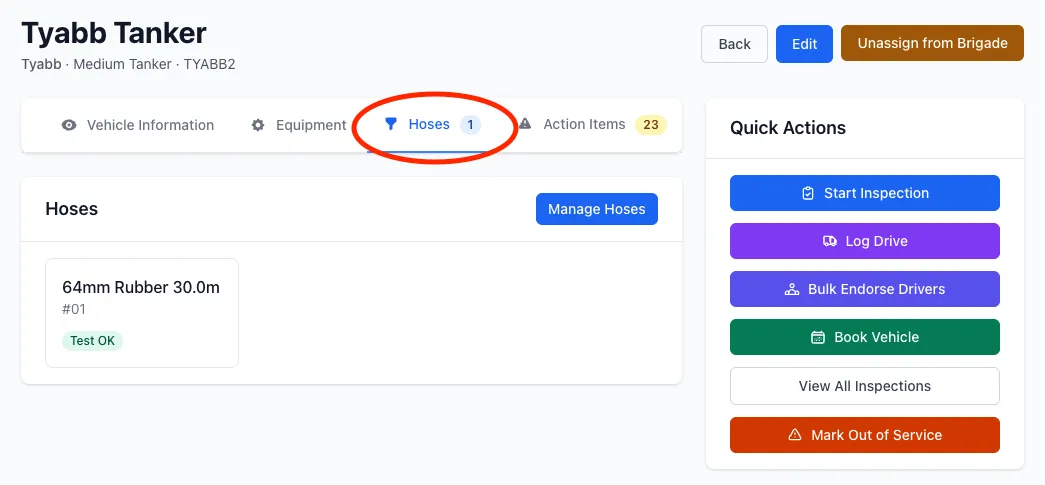
The tab shows three sections:
- On Vehicle — hoses currently assigned to this vehicle
- Hose Requirements — the par level configured for this vehicle (how many of each hose type it should carry), with the current on-vehicle count against it — see Set Vehicle Hose Requirements for how to configure these
- Available at Unit — in-service hoses at the unit that aren’t assigned anywhere, ready to assign
If the vehicle is short against its configured requirements, the tab’s badge on the vehicle page shows the number of hoses short instead of the usual on-vehicle count.
3. Assign a Hose
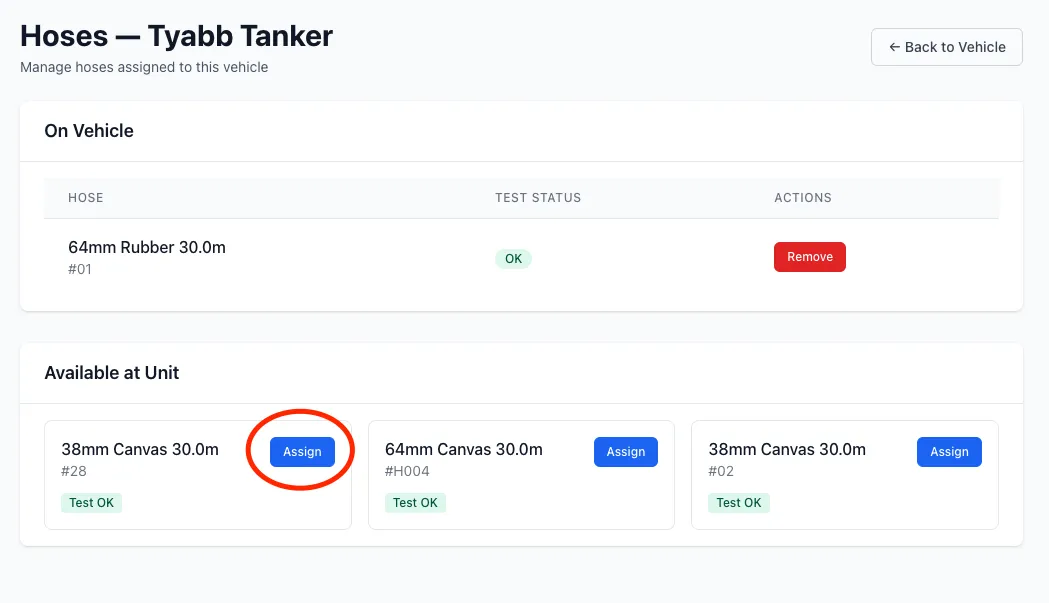
Section titled “3. Assign a Hose”- Scroll to Available at Unit and find the hose to assign
- Click Assign
4. Remove a Hose
Section titled “4. Remove a Hose”From the On Vehicle list:
- Click Remove next to the hose
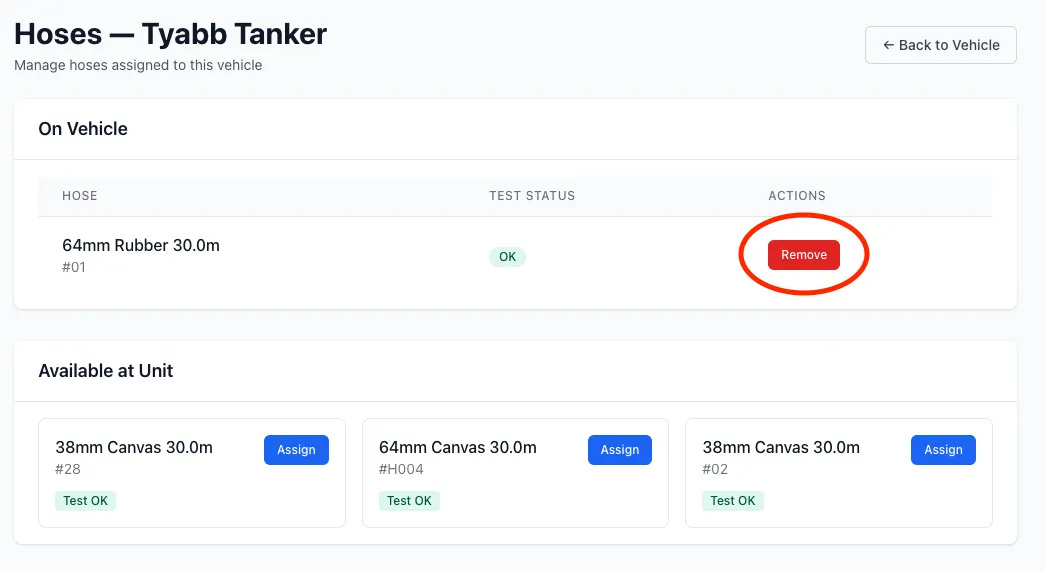
- Answer whether the hose was used operationally (flowed water), and optionally select a functional status and add condition notes (e.g., if the hose is being pulled for testing or repair)
- Click Remove from Vehicle
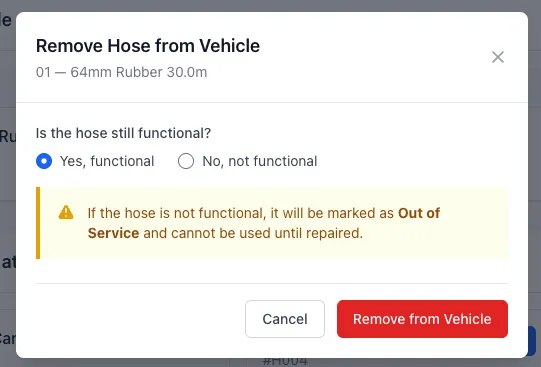
The hose returns to the unit pool — tagged with a storage location if one is set — and is available for reassignment. If the hose is not functional it will be marked out of service.
Managing Hoses During an Inspection
Section titled “Managing Hoses During an Inspection”If your brigade uses the hose selector inspection item type, crew can manage hose assignments as part of the inspection workflow — removing hoses taken off the vehicle and adding replacements from the unit pool without leaving the inspection form.
See Add Items to Sections in the template guide for how to configure the hose_selector item type.
Understanding the Audit Trail
Section titled “Understanding the Audit Trail”Every hose move — assignment or removal from a vehicle, storage location change, or cache swap — creates a Hose Transfer record that captures:
- Which hose moved
- Where it moved from and to (vehicle, storage location, or cache)
- Who performed the action and when
- Whether it was used operationally, and any condition notes recorded at the time
Transfer history is visible on the hose detail page.
Viewing Hoses on a Loaned Vehicle
Section titled “Viewing Hoses on a Loaned Vehicle”If your unit currently has another unit’s vehicle on loan, you can still open its Hoses tab to confirm all required hoses are back on board before returning it — a banner on the tab makes clear you’re viewing a loaned vehicle. This view is read-only: assigning, removing, or configuring hose requirements is only available to admins of the vehicle’s owning unit.
A Hose Can Only Be in One Place
Section titled “A Hose Can Only Be in One Place”A hose cannot be assigned to a vehicle, a storage location, and a cache all at once — assigning it to a vehicle or cache automatically clears any storage location tag. If you try to assign a cached hose directly to a vehicle, the system will prevent it — retrieve it from the cache first.
Common Issues
Section titled “Common Issues”Storage Location Not Available in the Dropdown
Section titled “Storage Location Not Available in the Dropdown”If the Move to Vehicle or Unit dropdown only offers a single “At Unit” option instead of your configured locations:
- Confirm Hose Tracking is enabled in Hose Settings
- Check the Storage Locations list has been saved with at least one entry
Hose Not Appearing in Available List
Section titled “Hose Not Appearing in Available List”If a hose isn’t showing up in the available list on the vehicle page:
- Check the hose is in-service (not out-of-service or retired)
- Confirm it is not already assigned to another vehicle
- Confirm it is not currently held in a cache location
- Verify the hose belongs to the same unit as the vehicle
Can’t Assign — Permission Denied
Section titled “Can’t Assign — Permission Denied”Assigning, removing, or swapping hoses from the vehicle’s Hoses tab requires a brigade admin role (or higher) for the vehicle’s unit — plain brigade user accounts can view the tab but not manage it. Hierarchy admins (district/region/group) can manage vehicles within their hierarchy, and organisation/super admins can manage any vehicle in scope. Contact your brigade admin if you don’t have access.
Removed Hose Still Showing on Vehicle
Section titled “Removed Hose Still Showing on Vehicle”Refresh the page. If the hose still appears, check for any pending errors in the transfer action.
Related Guides
Section titled “Related Guides”- Create a Hose — Add hoses to your inventory
- Set Vehicle Hose Requirements — Define par levels and track shortfalls per vehicle
- Hose Swapping — Cache-based hose swaps
- Public Hose Interface — Let visitors update hose locations without logging in
- Inspect a Hose — Record hose pressure tests
- Repair a Hose — Log repairs and defects
- How to Create an Inspection Template — Add a hose selector to your vehicle inspection
- Hose Management — Feature overview