Inspection Templates
Inspection Templates define the structure and content of inspections, allowing you to create customised checklists for different types of vehicles and equipment.
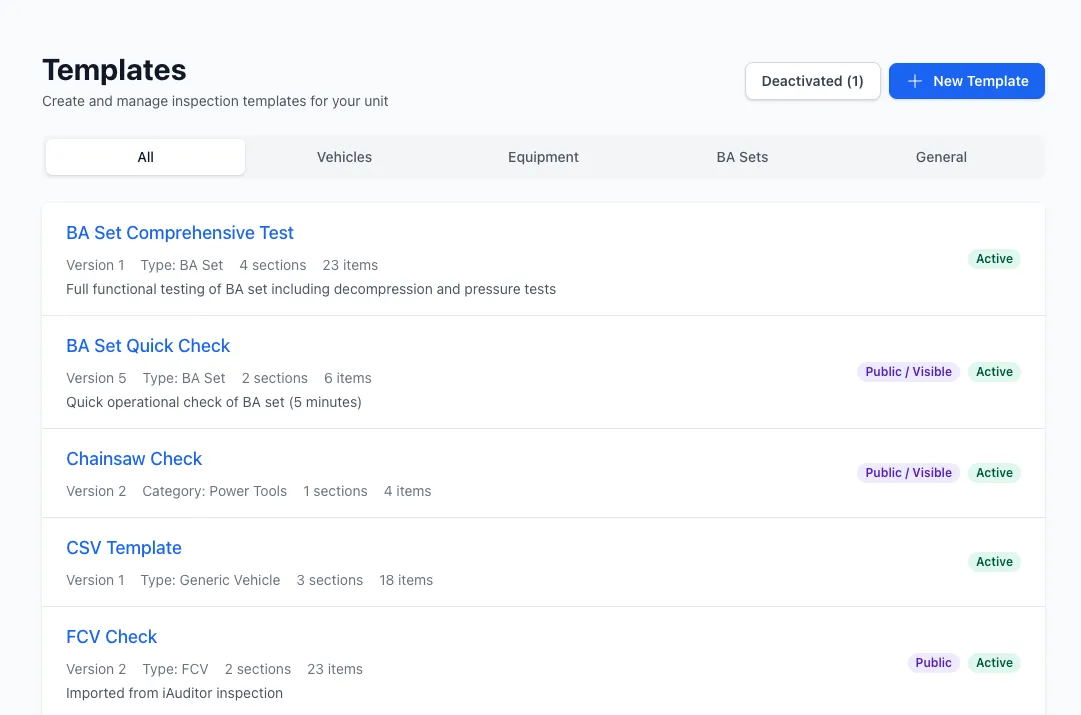
Overview
Section titled “Overview”Templates provide:
- Structured sections and subsections
- Multiple item types (pass/fail, photos, signatures, etc.)
- Automatic scoring and action generation
- Reference images for guidance
- Version control
- Public access via QR codes
Template Structure
Section titled “Template Structure”Templates are organised hierarchically:
Template├── Section 1 (e.g., "Engine & Transmission")│ ├── Item 1 (e.g., "Engine oil level - pass/fail")│ ├── Item 2 (e.g., "Coolant level - quantity_with_expiry")│ └── Subsection 1 (e.g., "Fluids")│ ├── Item 3│ └── Item 4│ └── Subsection 1.1 (e.g., "Coolant System")│ ├── Item 5│ └── Item 6└── Section 2 (e.g., "Safety Equipment") ├── Item 7 └── Item 8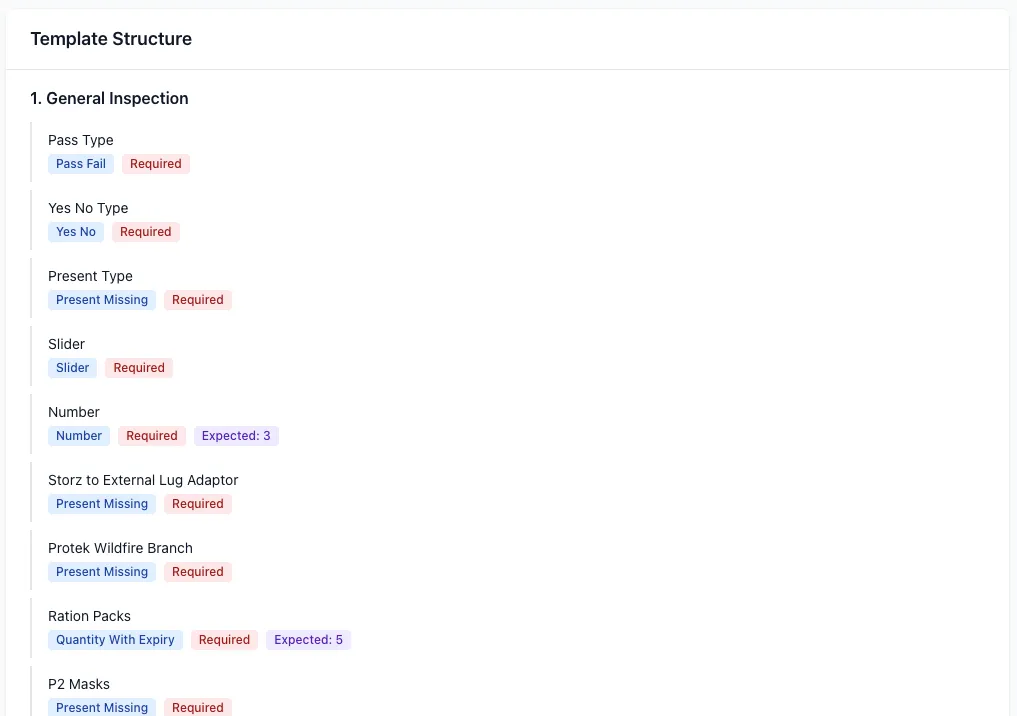
Sections
Section titled “Sections”Top-level groupings for organising inspection items:
- Title: Section name (e.g., “Engine Checks”, “Safety Equipment”)
- Items: List of inspection items
- Subsections: Nested groups for further organisation — subsections can themselves contain child subsections, to any depth, for grouping detail within an already-grouped area
Individual inspection points with configurable properties:
- Label: Question or item description
- Type: Item type (see Item Types)
- Scoring: Whether item contributes to pass/fail score
- Expected quantity: For quantity-based items
- Reference image: Optional guidance photo
Item Types
Section titled “Item Types”Templates support 11 different item types:
Binary Types
Section titled “Binary Types”pass_fail
- Binary pass/fail response
- Optional comment field
- Scoring: true (contributes to score)
- Auto-generates action on failure
yes_no
- Binary yes/no response
- Scoring: optional
- Use for presence checks
present_missing
- Binary presence check
- Scoring: true
- Auto-generates action when missing
Quantity & Expiry Types
Section titled “Quantity & Expiry Types”quantity_with_expiry
- Dual fields: quantity + expiry date
- Expected quantity threshold
- Flags low quantity or near-expiry items
- Example: “Water in coolant: 50L, expires 2024-12-31”
expiry_date
- Single expiry date field
- 30-day warning threshold
- Auto-generates action when expired or near expiry
Media Types
Section titled “Media Types”photo
- Photo capture via camera or upload
- Active Storage integration
- Multiple photos per item supported
signature
- Digital signature capture
- Stores signature URL
- Commonly used for inspector sign-off
Input Types
Section titled “Input Types”slider
- Numeric range (e.g., 1-10)
- Visual slider interface
- Optional comment field
number
- Numeric input
- Optional comment field
- Validation for numeric values only
text
- Open text field
- Free-form response
- Use for notes or descriptions
date
- Date picker
- Calendar interface
- Stores date value
Template Features
Section titled “Template Features”Versioning
Section titled “Versioning”Templates support automatic versioning:
- First use: Template snapshot taken on first inspection
- Editing in use: Creates new version instead of modifying
- Version linking: New version links to parent via
parent_template_id - Historical integrity: Old inspections reference original template structure
Appliance Type Filtering
Section titled “Appliance Type Filtering”Templates can be restricted to specific vehicle types:
- Filter by appliance type (4WD, A-class, B-class, etc.)
- Only compatible templates shown when creating inspection
- Ensures relevant checklists for each vehicle
Equipment Category Filtering
Section titled “Equipment Category Filtering”Templates can target equipment categories:
- Filter by equipment type
- Relevant templates for different gear types
Public Access
Section titled “Public Access”Templates can be shared publicly via QR codes:
- Toggle public access: Generate unique secure token
- QR code: Links to public inspection form
- Public URL:
new_public_inspection_path(token) - No authentication: Anyone can conduct inspection
- Email notifications: Admins notified on completion
Reference Images
Section titled “Reference Images”Attach guidance photos to items:
- Visual examples of correct conditions
- Help inspectors identify issues
- Attached via Active Storage
- Displayed during inspection
Follow-Up Questions
Section titled “Follow-Up Questions”Items can define follow-up questions that only appear when the parent item’s response matches a specific trigger condition — avoiding clutter for the common case while still capturing extra detail when something needs it:
- Binary/choice items (
yes_no,pass_fail,present_missing,radio,dropdown) trigger off a specific answer value (e.g. “Fail”, “Missing”, a specific radio option) - Quantity items (
number,quantity_with_expiry) trigger off a threshold instead — “quantity below expected” or “expiring soon” (within 30 days) - A follow-up can itself have follow-ups, nested to any depth
- Resolves parent action: a follow-up can be marked to automatically suppress the parent item’s auto-generated action once answered satisfactorily (e.g. a “Replacement ordered?” follow-up resolving a “missing” parent)
See Add Follow-Up Questions for the full workflow.
CSV Import & Export
Section titled “CSV Import & Export”Templates can be built or updated from a spreadsheet instead of the visual editor:
- Import: Download a sample CSV, fill in sections/items, and import to generate a template instantly
- Export: Download any template’s current structure as CSV
- Update via CSV: Re-importing an edited CSV against an existing template always creates a new version — the current version stays linked to its existing inspections
- Nested subsections and follow-up questions are both representable in the CSV format
See Importing Templates from CSV for column reference and the full workflow.
Template Lifecycle
Section titled “Template Lifecycle”1. Create Template
Section titled “1. Create Template”Define structure:
- Add sections and subsections
- Configure items with types and labels
- Set scoring flags
- Attach reference images
- Specify appliance type or equipment category
2. Activate Template
Section titled “2. Activate Template”Mark template as active:
is_active = true- Shows in template selection UI
- Available for inspections
3. Use Template
Section titled “3. Use Template”Inspections use template structure:
- First use snapshots template
- Subsequent edits create new versions
- Old inspections preserve structure
4. Edit Template
Section titled “4. Edit Template”Modify template:
- No inspections: Edit in place
- Has inspections: Creates new version
- Previous version can be deactivated
5. Archive Template
Section titled “5. Archive Template”Deactivate old versions:
is_active = false- Hidden from template selection
- Historical inspections unaffected
Scoring Configuration
Section titled “Scoring Configuration”Templates define scoring behavior:
- Scorable items: Flag items that contribute to pass/fail
- Pass threshold: 80% of scorable items must pass
- Auto-calculation: System calculates score on completion
- Action generation: Failed items create actions automatically
Expected Duration
Section titled “Expected Duration”Templates can specify expected inspection time:
expected_duration_minutesfield- Helps plan inspection schedules
- Tracks actual vs expected duration
- Identifies slow or complex inspections
Best Practices
Section titled “Best Practices”Organising Sections
Section titled “Organising Sections”- Group related items together
- Use subsections for detailed areas
- Keep sections focused (5-10 items max)
Choosing Item Types
Section titled “Choosing Item Types”- Use pass_fail for critical safety items
- Use present_missing for required equipment
- Use quantity_with_expiry for consumables
- Use photo for visual documentation
Scoring Items
Section titled “Scoring Items”- Mark critical safety items as scorable
- Keep non-critical items as non-scorable
- Balance between strict and lenient scoring
Reference Images
Section titled “Reference Images”- Add reference images for complex items
- Show examples of pass and fail conditions
- Use clear, well-lit photos
Related Features
Section titled “Related Features”- Inspections - Conduct inspections using templates
- Vehicles - Assign default templates to vehicles
- Equipment - Assign templates to equipment
- Inspection Schedules - Schedule recurring template-based inspections