Station Locations
Station locations let you define the physical stations or response points your members can be assigned to when they set their availability. Once configured, members can select which station they’ll be at for each day — giving admins an at-a-glance view of crew distribution across your locations.
Prerequisites
Section titled “Prerequisites”- Brigade admin or organisation admin role
- Availability module enabled for your brigade
What are Station Locations?
Section titled “What are Station Locations?”Station locations are optional named places (e.g., Main Station, Satellite Station) that members can select when recording their availability. If your brigade operates from a single location you don’t need to configure stations. They are most useful when:
- Your brigade has multiple stations or response posts
- Members rotate between locations
- Admins need to know which station is staffed on a given day
Add a Station
Section titled “Add a Station”1. Open the Brigade Availability Page
Section titled “1. Open the Brigade Availability Page”- Log in to StationOne
- Click Availability in the main navigation
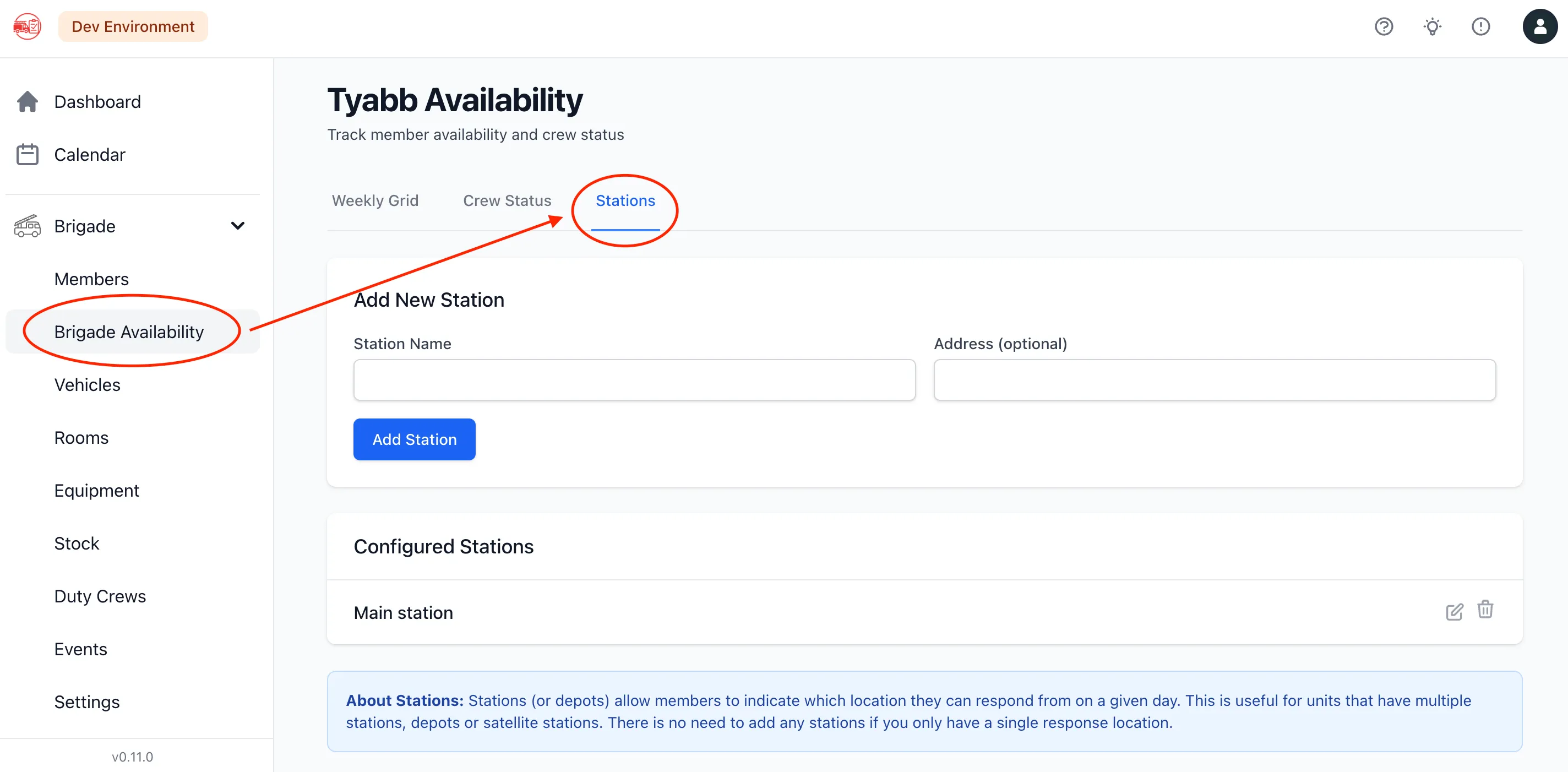
2. Go to the Stations Tab
Section titled “2. Go to the Stations Tab”- Select the Stations tab at the top of the page
3. Add a New Station
Section titled “3. Add a New Station”- Click Add Station
- Fill in the station details:
Name (required)
- A short, recognisable name for the location
- Examples: Main Station, North Cache, Satellite Depot, Station 2
Address (optional)
- The street address of the location
- Useful for members or admins who need to identify the site
- Click Save
The station appears immediately in the list and is available for members to select when recording their availability.

Edit a Station
Section titled “Edit a Station”- On the Stations tab, find the station to update
- Click Edit next to its name
- Update the name or address
- Click Save
Changes are applied immediately. Existing availability records that reference this station are not affected — the station ID remains the same.
Remove a Station
Section titled “Remove a Station”- On the Stations tab, find the station to remove
- Click Delete next to its name
- Confirm the deletion
The station is removed from the list. Any future availability entries will no longer be able to reference it. Historical records that already included this station are not modified.
How Members Use Stations
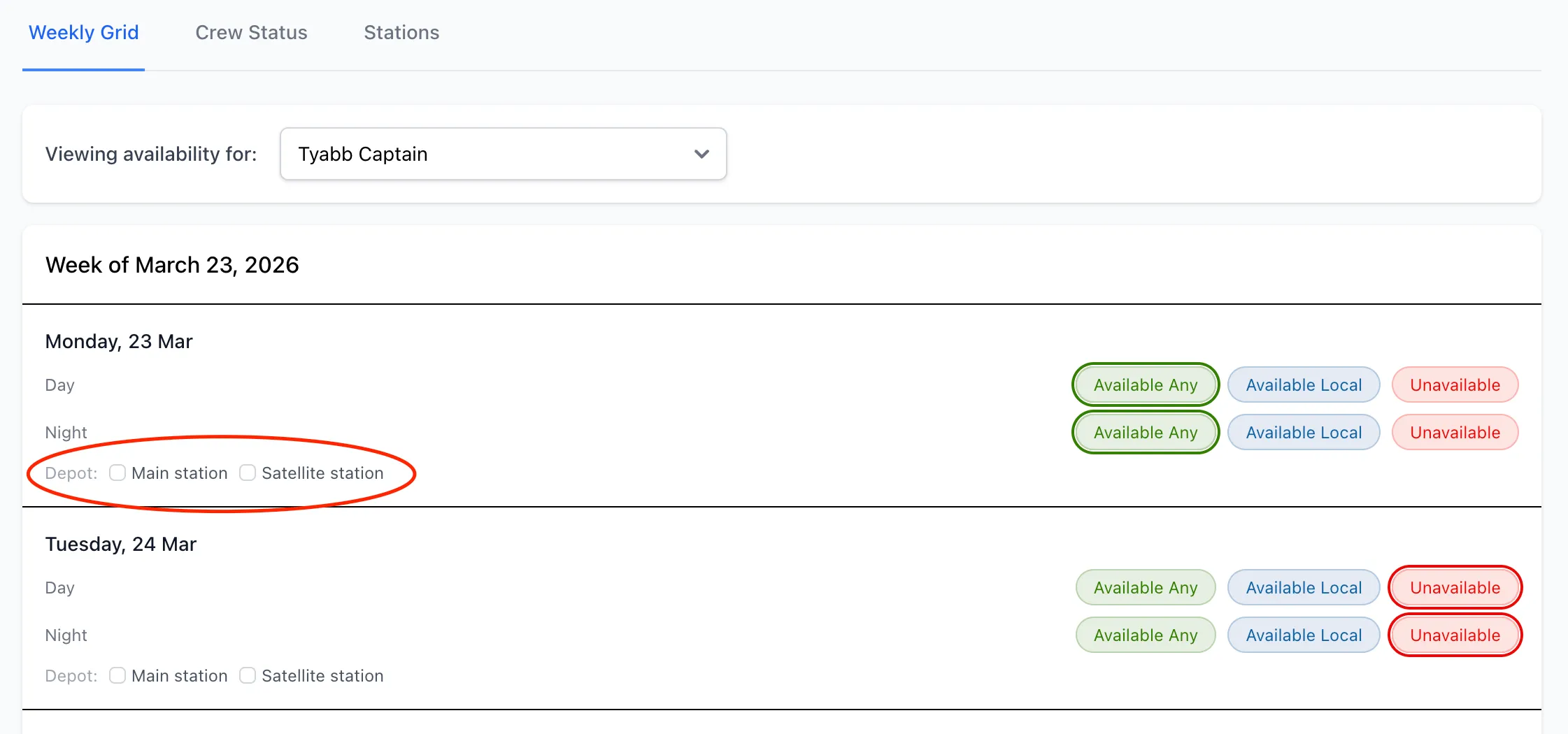
Section titled “How Members Use Stations”Once stations are configured, members see a Stations section when setting their availability for each day. They can check one or more stations to indicate where they’ll be working that day.
In the brigade availability grid and crew status view, station assignments appear as badges under each member’s name, making it easy to see at a glance which station each person will be at.
Keep Names Short
Section titled “Keep Names Short”Station names appear in small badges throughout the availability grid. Short names (two to three words) display more cleanly than long descriptions.
Use Addresses for Clarity
Section titled “Use Addresses for Clarity”If your station names aren’t self-explanatory, adding the address helps members pick the right location from the list.
Stations are per-Brigade
Section titled “Stations are per-Brigade”Stations are scoped to your unit. If your organisation has multiple units, each unit manages its own station list independently.