Function Events
The Function event type is designed for catered social gatherings such as annual dinners, awards nights, presentation evenings, and other events where you need to track additional guests and catering requirements alongside your regular RSVP.
What makes a Function event different
Section titled “What makes a Function event different”When an event is set to the Function type, StationOne automatically enables catering mode, which adds:
- A catering details form on the RSVP — members can record their own dietary requirements and add additional guests (name + dietary requirements per guest)
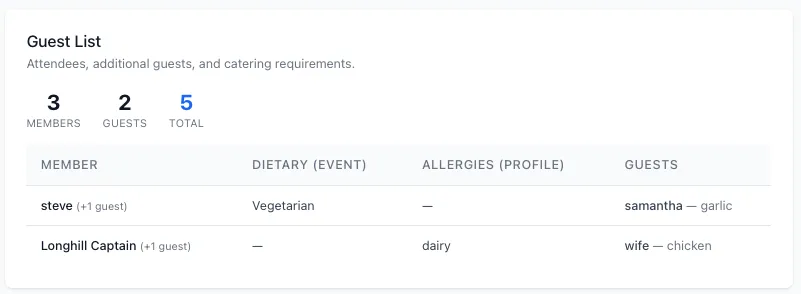
- A Guest List panel visible to admins showing all attendees, their guests, and any dietary requirements
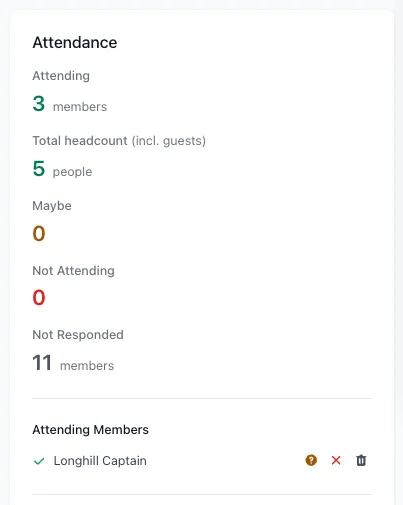
- A total headcount in the attendance sidebar that counts both RSVPing members and their additional guests
- Guest names listed under each external invitee in the external invitees section
These features are also available on any event type if you manually tick Catered Event when creating or editing the event.
Create a Function event
Section titled “Create a Function event”- Click Events in the main navigation
- Click New Event
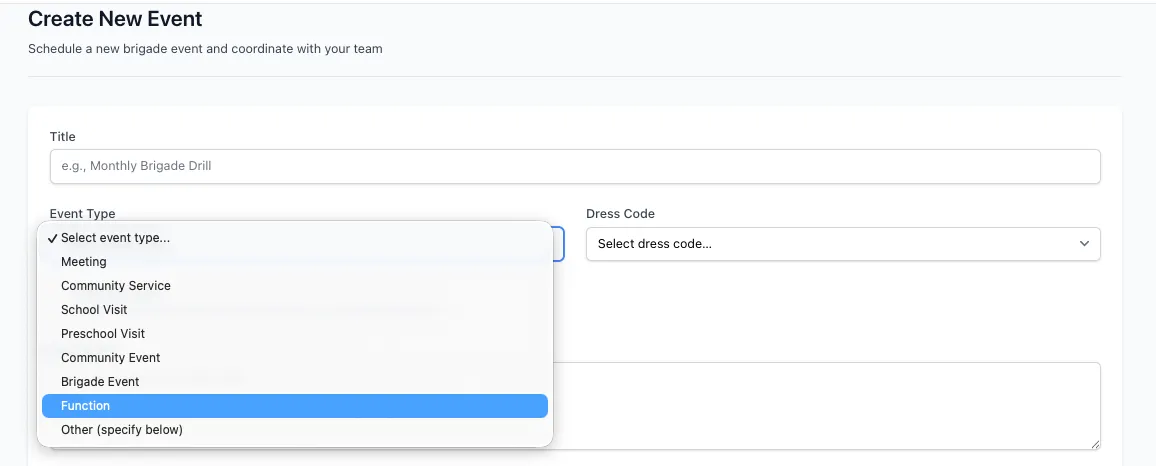
- Set Event Type to Function
- The Catered Event checkbox is automatically ticked
- Fill in the remaining event details (title, date, location, etc.)
- Click Create Event
How members RSVP
Section titled “How members RSVP”When a member opens a catered event, their RSVP section includes two parts:
1. Standard RSVP buttons
Section titled “1. Standard RSVP buttons”Members select Attending, Maybe, or Not Attending as normal.
2. Catering details form
Section titled “2. Catering details form”Once a member has responded Attending or Maybe, a Catering Details section appears below the RSVP buttons where they can:
- Enter their own dietary requirements (e.g. vegetarian, gluten free)
- Add additional guests — each guest requires a name and an optional dietary requirement
Guests are saved separately from the member’s own RSVP so the admin guest list stays accurate.
Members can update their catering details at any time before the event by returning to the event page. On the Station Portal, clicking RSVP again on the event will re-open the form with their previously saved details pre-filled.
How external invitees RSVP
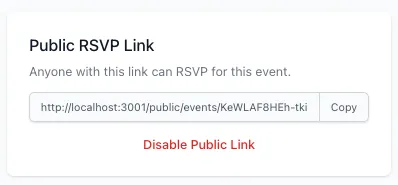
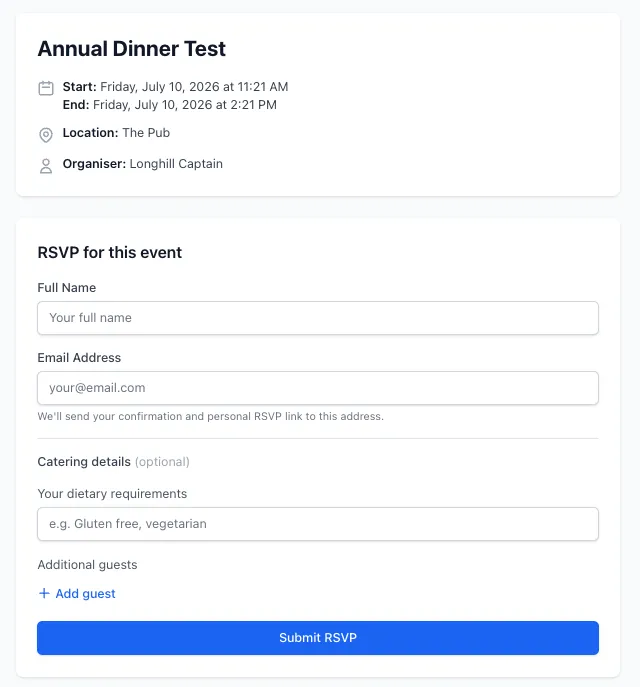
Section titled “How external invitees RSVP”External guests invited via email (without a StationOne account) can also provide catering details.
When they follow their invitation link and complete the RSVP form, a Catering Details section appears below the name and email fields (for catered events only). They can enter:
- Their own dietary requirements
- Additional guests with names and optional dietary requirements
Members who click an RSVP link from an invitation email are shown the catering form on their confirmation page after their response is recorded.
Station portal RSVPs
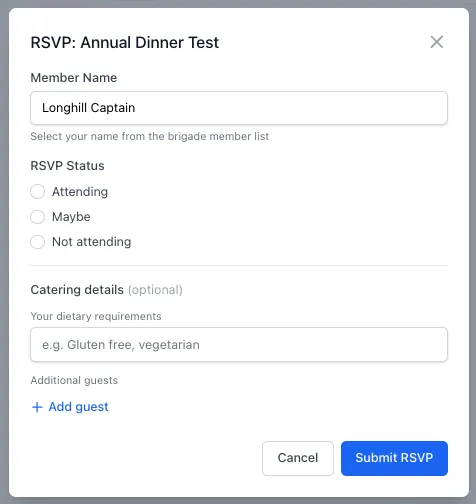
Section titled “Station portal RSVPs”Members using the Station Portal to RSVP will see the catering section appear in the RSVP modal when the event is a catered type. The same dietary requirements and guest fields are available.
Guest List (admin view)
Section titled “Guest List (admin view)”Admins see a Guest List panel on the event details page for all catered events. This panel shows:
- Headcount summary — total members RSVPing, total additional guests, and combined total
- Per-attendee table — each attending or maybe member with:
- Their event-specific dietary requirements
- Their profile allergies (from their member record)
- Their additional guests and each guest’s dietary requirements
The guest list only shows members who have Attending or Maybe status, so it stays focused on planning numbers.
Attendance sidebar headcount
Section titled “Attendance sidebar headcount”For catered events with additional guests, the attendance sidebar shows a Total headcount figure below the Attending count:
- Attending — number of RSVPs with attending status
- Total headcount (incl. guests) — attending + maybe RSVPs plus all additional guests across those attendances
This gives you the planning number you need when confirming catering quantities with a venue or caterer.
External invitees
Section titled “External invitees”In the External Invitees list, any additional guests added by an external invitee are listed under their name. This keeps the primary contact’s details visible while still accounting for everyone they are bringing.
Download a report
Section titled “Download a report”The event PDF report (available from the event details page) includes a Catering Summary section for catered events, showing:
- Member and guest headcount totals
- Each attendee’s dietary requirements and profile allergies
- Guest names and their dietary requirements
Use this report to share a clean guest list with a venue or catering coordinator.
Related guides
Section titled “Related guides”- Create and Manage Events — Creating, editing, and cancelling events
- RSVPs and Attendance — Managing RSVPs, post-event attendance, and reminders