Managing Your Brigade Subscription
This guide covers subscription management for independent brigades — those that manage their own billing rather than being covered by an organisation.
Who This Applies To
Section titled “Who This Applies To”Subscription management is only available to independent brigades. If your brigade is part of an organisation that manages billing centrally (org-managed), your subscription tab will show a notice directing you to your organisation administrator.
Accessing Subscription Settings
Section titled “Accessing Subscription Settings”- Log in to StationOne as a brigade admin
- Navigate to Brigade Settings
- Click the Subscription tab
Trial Period
Section titled “Trial Period”All new independent brigades start with a 30-day free trial. During the trial you have full access to all platform features at no cost.
When your trial is ending soon (within 7 days), a warning banner will appear prompting you to subscribe. Once the trial expires without an active subscription, modifications are blocked — you can still view your data but cannot add or update records until you subscribe.
Subscription Plans
Section titled “Subscription Plans”Two plans are available for independent brigades:
| Plan | Price | Notes |
|---|---|---|
| Monthly | $16 / month | Flexible, cancel anytime |
| Annual | $176 / year (~$14.67/month) | Save $16 compared to monthly |
Both plans include all platform features, unlimited members, and email support. Annual subscribers receive priority email support.
Subscribing
Section titled “Subscribing”If you have no active subscription:
- Go to Brigade Settings → Subscription
- Click Choose a Plan
- Select Monthly or Annual
- Complete checkout via Stripe (secure card payment)
- After checkout you are redirected back to Brigade Settings with your subscription active
Billing starts immediately after checkout. There are no additional fees or penalties for cancelling.
Managing an Active Subscription
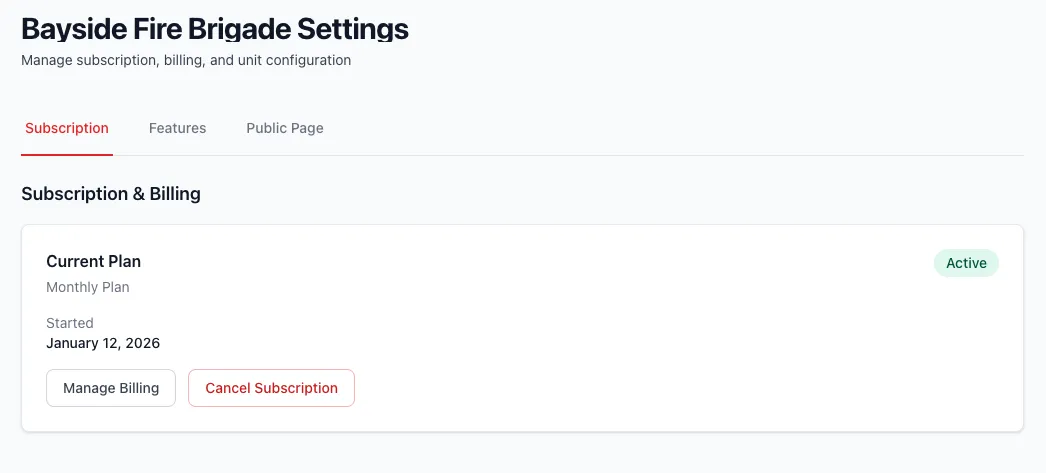
Section titled “Managing an Active Subscription”Once subscribed, the Subscription tab shows your current plan, status, subscription start date, and next billing date.
Manage Billing
Section titled “Manage Billing”Click Manage Billing to open the Stripe customer portal. From there you can:
- Update your payment method
- Download invoices
- Change your plan (monthly ↔ annual)
Cancel Subscription
Section titled “Cancel Subscription”- Click Cancel Subscription
- Confirm the cancellation
- Your subscription is cancelled but you retain full access until the end of the current billing period
After cancellation a notice shows the date access expires. You can resubscribe at any time before or after that date.
Resubscribing
Section titled “Resubscribing”If your subscription has been cancelled:
- Go to Brigade Settings → Subscription
- Click Resubscribe
- You are taken to the Stripe portal (if a billing account exists) or the plan selection page
Subscription Statuses
Section titled “Subscription Statuses”| Status | Meaning |
|---|---|
| Trial | Free trial period, full access |
| Active | Paid subscription in good standing |
| Past Due | Payment failed, access may be limited |
| Cancelled | Cancelled, access continues until period end |
| Complimentary | Free access granted by system administrator |
Complimentary Subscriptions
Section titled “Complimentary Subscriptions”Some brigades are granted complimentary (free) access by a system administrator. If your brigade has been granted complimentary access, the Subscription tab will show a Complimentary badge and confirm that no billing is required. Contact your system administrator for questions about complimentary access.
Org-Managed Brigades
Section titled “Org-Managed Brigades”If your brigade belongs to an organisation that handles billing centrally, the Subscription tab shows:
“Your subscription is managed by [Organisation Name]. Contact your organisation administrator for billing questions.”
No subscription actions are available in this case.