Events
The Events system allows brigades to organise activities, track member attendance, and coordinate resources for scheduled events.
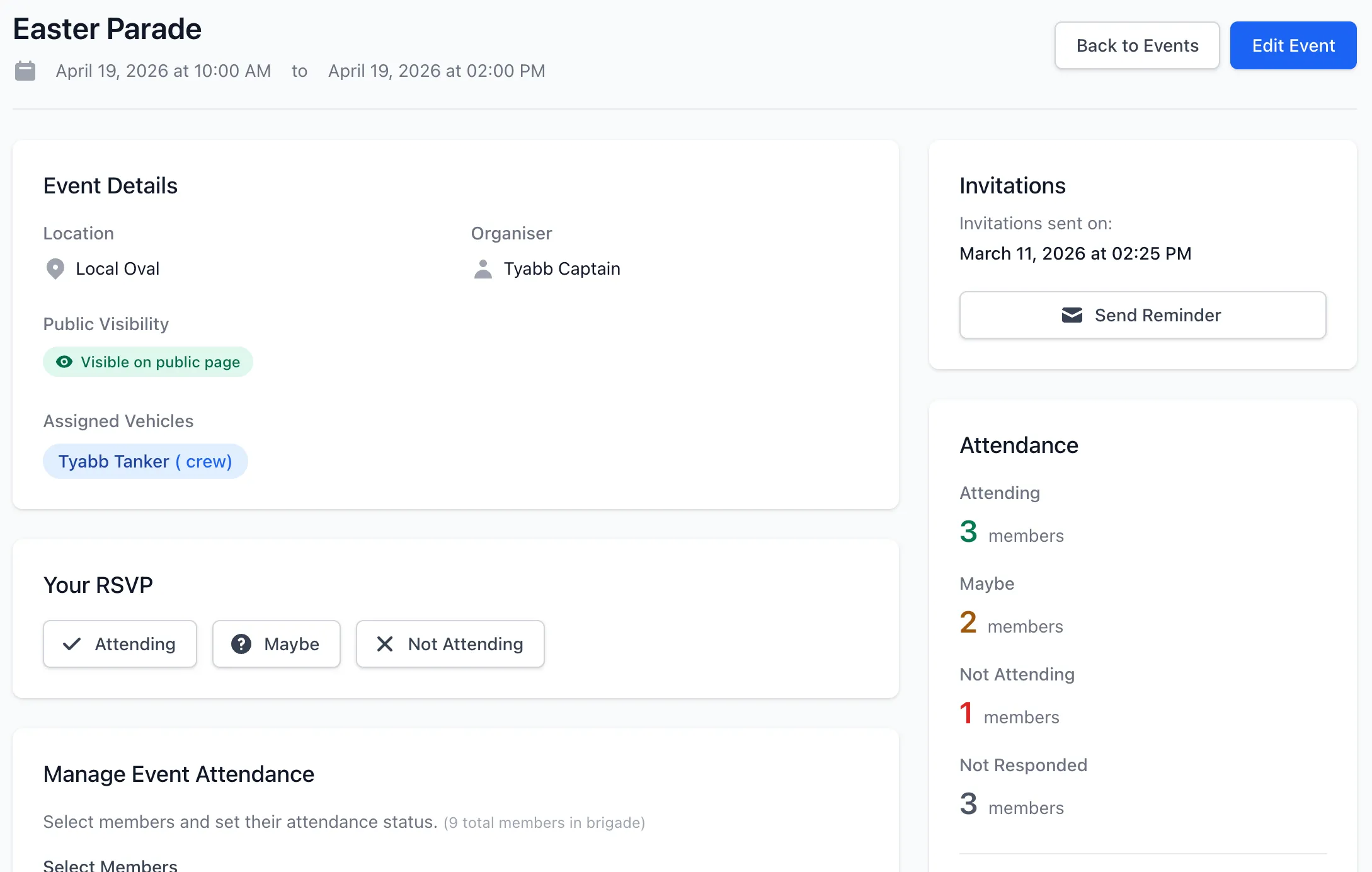
Overview
Section titled “Overview”Events in StationOne provide:
- Event creation with dates, times, locations, and descriptions
- Two-phase attendance tracking: pre-event RSVP intent and post-event confirmed attendance
- Vehicle assignment and automatic booking
- Flexible notification system (immediate or scheduled)
- Targeted reminders to specific attendance groups
- Configurable automatic reminders (30 minutes to 24 hours before) to attending members
- Event cancellation with notifications
- Manual member addition by administrators
- Public event visibility (when enabled)
Event Properties
Section titled “Event Properties”Each event includes:
- Basic Information: Title, description, location
- Schedule: Start date/time, end date/time
- Resources: Assigned vehicles (with automatic bookings)
- Creator: User who created the event
- Unit & Organisation: Event ownership and scope
- Notifications: Invitation timestamp, reminder timing (off, or 30 minutes–24 hours before start), reminder-sent timestamp
- Cancellation: Cancellation timestamp and reason (if cancelled)
Attendance Tracking
Section titled “Attendance Tracking”Events use a two-phase attendance model that separates pre-event intent from confirmed post-event attendance.
Phase 1 — RSVP (Pre-Event Intent)
Section titled “Phase 1 — RSVP (Pre-Event Intent)”Members respond to event invitations to signal whether they plan to attend. These are set by members via RSVP links or by admins on the member’s behalf.
Attending
- Member plans to attend
- Receives the automatic reminder (if enabled) before the event starts
- Notified if event is cancelled
- Does not count as attended in reports until an admin confirms post-event
Maybe
- Member is unsure about attendance
- Notified if event is cancelled
- Can update status closer to event date
Not Attending
- Member confirms they cannot attend
- Not notified of cancellation
- Can change status if plans change
Apology (meeting events only)
- Same as Not Attending, using formal meeting terminology
Not Responded
- Member has not yet responded to invitation
- Can be targeted with reminder emails
Phase 2 — Confirmed Attendance (Post-Event)
Section titled “Phase 2 — Confirmed Attendance (Post-Event)”After an event ends, admins mark actual attendance. These statuses are the ones counted in member activity reports.
Attended
- Admin has confirmed the member was present
- Counts toward attendance in member activity reports
- Set using the ✓ Attended button (visible after event ends)
Absent
- Admin has recorded the member did not attend despite RSVPing
- Does not count toward attendance in reports
- Set using the ✗ Absent button (visible after event ends)
This separation prevents future recurring events from inflating attendance percentages, and ensures no-shows are not counted as attended simply because they RSVPd.
RSVP Tokens
Section titled “RSVP Tokens”Each event attendance includes a unique RSVP token that allows:
- One-click RSVP directly from email
- Attendance updates without logging in
- Secure response tracking per member
RSVP Tokens
Section titled “RSVP Tokens”Each event attendance includes a unique RSVP token that allows:
- One-click RSVP directly from email
- Attendance updates without logging in
- Secure response tracking per member
Notification System
Section titled “Notification System”Events support flexible notification strategies:
Initial Invitations
Section titled “Initial Invitations”When creating an event, you can:
- Send invitations immediately to all unit members
- Save event without sending (send invitations later)
- Invitations include event details and RSVP links
Targeted Reminders
Section titled “Targeted Reminders”Send reminder emails to specific groups:
- All Members: Everyone in the unit
- Attending: Only those who RSVPd they plan to attend
- Maybe: Only those who selected maybe
- Not Attending: Only those who declined
- Not Responded: Only those who haven’t responded
- Maybe & Not Attending: Combined group
Each reminder can include a custom message from the event organiser.
Automatic Reminders
Section titled “Automatic Reminders”The system can automatically send a reminder before the event starts:
- Timing is configurable per event: 30 minutes, 1, 2, 4, 12, or 24 hours before start, or off
- Sent to all members with Attending RSVP status
- Occurs once per event (tracked by timestamp); resets if the event’s start time or reminder timing is changed after sending
- Executed via scheduled background job
- Includes full event details
Vehicle Assignment
Section titled “Vehicle Assignment”Events can be assigned vehicles:
Automatic Vehicle Bookings
Section titled “Automatic Vehicle Bookings”When vehicles are assigned to an event:
- Vehicle bookings automatically created
- Bookings are pre-approved
- Covers event start to end time
- Purpose includes event title
- Destination matches event location
- Vehicle availability updated
Booking Synchronisation
Section titled “Booking Synchronisation”Vehicle assignments stay synchronised:
- Adding vehicles creates new bookings
- Removing vehicles deletes associated bookings
- Updating event times updates booking times
- Cancelling events releases all bookings
Event Cancellation
Section titled “Event Cancellation”Events can be cancelled with proper notification:
Cancellation Process
Section titled “Cancellation Process”When an event is cancelled:
- Cancellation timestamp recorded
- Optional cancellation reason saved
- All vehicle bookings released
- Notifications sent to affected members
Cancellation Notifications
Section titled “Cancellation Notifications”Only members who were planning to attend receive cancellation emails:
- Members with Attending RSVP status notified
- Members with Maybe RSVP status notified
- Members with Not Attending are not notified
- Cancellation reason included if provided
Cancelled Event Handling
Section titled “Cancelled Event Handling”Cancelled events:
- Remain in the system for historical record
- Appear in separate “Cancelled” list
- Cannot receive new invitations
- Vehicle bookings are released
- RSVP functionality disabled
Manual Member Management
Section titled “Manual Member Management”Administrators can manually add members to events:
Adding Members
Section titled “Adding Members”Event managers can:
- Add unit members who weren’t automatically invited
- Set initial status (attending, maybe, not responded)
- Update existing member status
- Manage attendance without sending emails
This is useful for:
- Adding new members to existing events
- Correcting attendance records
- Manual coordination with specific members
Permissions
Section titled “Permissions”Manual member management requires:
- Event manage_members permission
- Brigade admin or higher role
- Member must belong to event’s unit
Public Events
Section titled “Public Events”When public events are enabled at the unit level:
- Upcoming events appear on Station Portal
- Limited to next 10 upcoming events
- Shows basic event information
- No RSVP functionality for public viewers
- Helps community stay informed of brigade activities
Event Timeline
Section titled “Event Timeline”Typical event lifecycle:
- Creation: Administrator creates event with details and vehicle assignments
- Invitation: Invitations sent immediately or scheduled for later
- RSVP Period: Members respond with attendance status (Attending, Maybe, Not Attending)
- Reminders: Targeted reminders sent to specific groups as needed
- Manual: Organisers can send additional reminders at any time
- Automatic: A configured reminder (if enabled) sends to members with “Attending” RSVP status before the event starts
- Event Occurs: Event takes place with coordinated resources
- Post-Event: Admin marks actual attendance — Attended or Absent — for each member
- Reporting: Only members marked Attended count in member activity reports
Or if cancelled:
- Cancellation: Administrator cancels with reason
- Notifications: Attending and maybe members notified
- Resource Release: Vehicle bookings released
- Archive: Event marked as cancelled in system
Event Lists
Section titled “Event Lists”Events are organised into three categories:
Upcoming Events
Section titled “Upcoming Events”- Start date is in the future
- Not cancelled
- Ordered by start date (soonest first)
- Primary focus for planning and RSVPs
Past Events
Section titled “Past Events”- Start date is in the past
- Not cancelled
- Ordered by start date (most recent first)
- Limited to 10 most recent for quick reference
Cancelled Events
Section titled “Cancelled Events”- Marked as cancelled (regardless of date)
- Ordered by cancellation date
- Limited to 10 most recent
- Maintained for historical record
Permissions
Section titled “Permissions”Event management operates with role-based permissions:
- View Events: All unit members
- Create Events: Brigade administrators and above
- Edit Events: Event creator or brigade administrators
- Delete Events: Event creator or brigade administrators
- Cancel Events: Event creator or brigade administrators
- Manage Members: Brigade administrators and above
- Send Invitations: Event creator or brigade administrators
- Update Own Attendance: All unit members (for events they can view)
Integration with Vehicle Bookings
Section titled “Integration with Vehicle Bookings”Events integrate seamlessly with the vehicle booking system:
- Event vehicle assignments create approved bookings
- Bookings marked as “Event: [Title]”
- Vehicle availability automatically updated
- Prevents double-booking during event times
- Bookings released if event cancelled or vehicles removed
Email Notifications
Section titled “Email Notifications”The system sends three types of event emails:
New Event Notification
Section titled “New Event Notification”- Sent when invitations are triggered
- Includes full event details
- Contains one-click RSVP links
- Customisable with reminder message
Reminder Notification
Section titled “Reminder Notification”- Same format as new event notification
- Subject prefixed with “Reminder:”
- Can include custom message from organiser
- Sent to filtered recipient groups
Cancellation Notification
Section titled “Cancellation Notification”- Sent only to attending and maybe members
- Includes cancellation reason if provided
- Notifies of vehicle booking release
- Cannot RSVP to cancelled events
Day-Of Reminder
Section titled “Day-Of Reminder”- Sent automatically on event date
- Only to members with “attending” status
- Subject prefixed with “Today:”
- Sent once per event via background job
Related Features
Section titled “Related Features”- Public Access - Public event visibility
- Vehicles - Vehicle assignment and bookings
- Manage Events - Step-by-step guide including recording post-event attendance