Equipment Tracking
The Equipment Tracking module helps you manage tools, safety gear, and other fire service equipment with inspection scheduling and maintenance tracking.
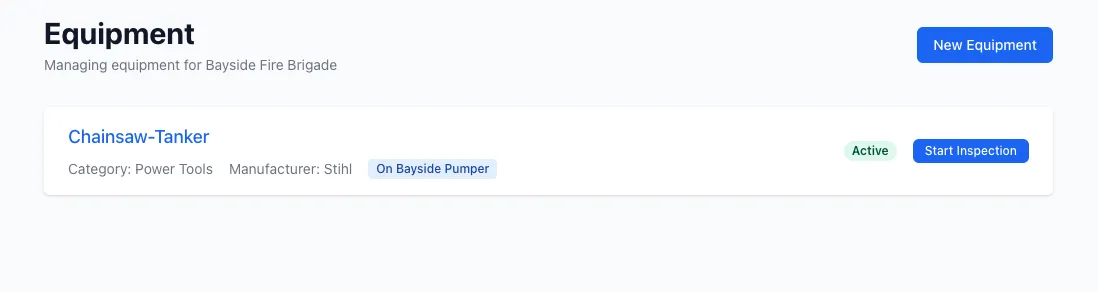
Overview
Section titled “Overview”Equipment Tracking provides:
- Equipment inventory management
- Vehicle-mounted and standalone equipment
- Inspection scheduling (same as vehicles)
- Template-based inspections
- Equipment categorization
- Active/inactive status tracking
- Out of service management
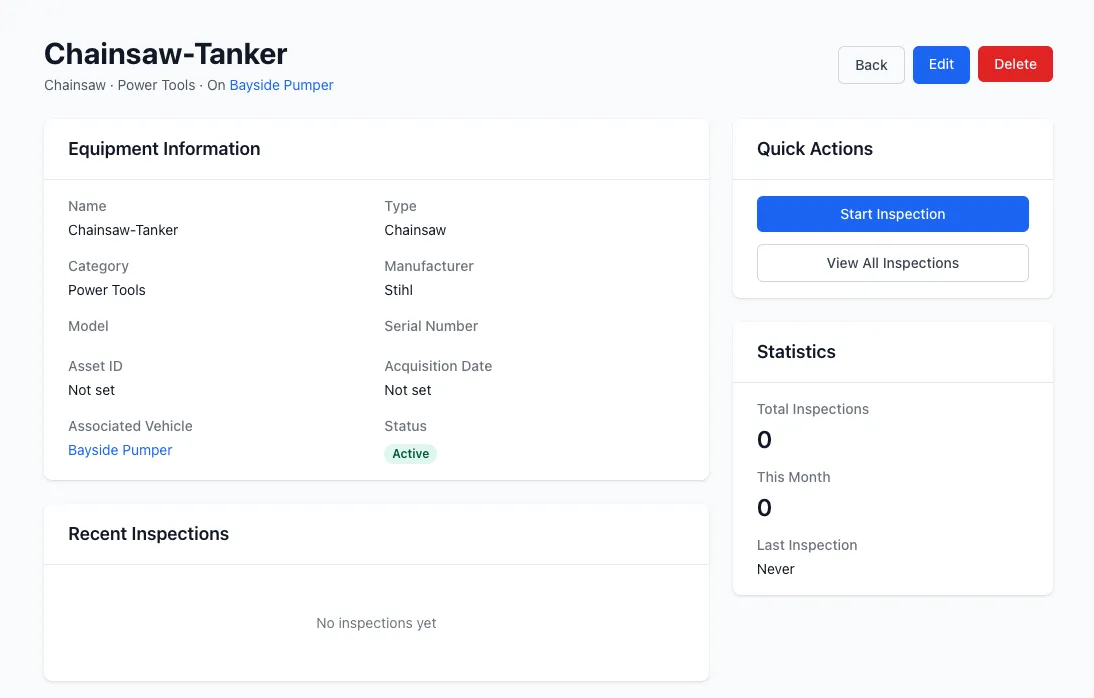
Equipment Records
Section titled “Equipment Records”Each equipment item includes:
- Name: Equipment description
- Equipment category: Type classification
- Serial number: Unique identifier
- Location: Storage location
- Vehicle assignment: Optional vehicle mounting
- Status: Active or inactive
- Next inspection due: From schedules
Equipment Categories
Section titled “Equipment Categories”Organize equipment by category:
- Safety gear: PPE, helmets, gloves, boots
- Tools: Hand tools, power tools, rescue tools
- Breathing apparatus: BA sets, cylinders
- Rescue equipment: Ropes, harnesses, stretchers
- Communication: Radios, pagers
- Medical: First aid, AED, oxygen
- Custom categories: Define your own
Equipment Assignment
Section titled “Equipment Assignment”Vehicle-Mounted Equipment
Section titled “Vehicle-Mounted Equipment”Equipment can be assigned to vehicles:
- Belongs to vehicle: Associated via vehicle_id
- Inspected with vehicle: Part of vehicle inspection
- Location tracking: Moves with vehicle
- Dependent lifecycle: Removed when vehicle removed
Standalone Equipment
Section titled “Standalone Equipment”Equipment not assigned to vehicles:
- Independent tracking: Separate inventory
- Location-based: Stored at station or location
- Separate inspections: Own inspection schedules
- Flexible reassignment: Can be moved between locations
Equipment Inspections
Section titled “Equipment Inspections”Equipment uses the same inspection system as vehicles:
Inspection Templates
Section titled “Inspection Templates”- Create equipment-specific templates
- Filter templates by equipment category
- Multiple item types supported
- Reference images for guidance
Inspection Scheduling
Section titled “Inspection Scheduling”Schedule recurring equipment inspections:
- Daily, weekly, monthly, quarterly, annual
- Multiple schedules per equipment item
- Overdue and due soon tracking
- Automatic next due date calculation
Inspection Process
Section titled “Inspection Process”Same workflow as vehicle inspections:
- Select equipment item
- Choose template (filtered by category)
- Conduct inspection
- Complete and submit
- Actions auto-generated for failures
- Schedule updated
Out of Service Management
Section titled “Out of Service Management”When equipment fails inspection:
- Flag item: Mark specific inspection item out of service
- Action creation: Automatic maintenance action
- Unavailable: Equipment flagged in system
- Reinstatement: Auto-reinstated when action closes
- Tracking: Reason and responsible user recorded
Equipment Status
Section titled “Equipment Status”Active
Section titled “Active”- Currently in use
- Appears in standard lists
- Available for assignment
- Scheduled for inspections
Inactive
Section titled “Inactive”- Not currently in use
- Hidden from standard views
- Not available for assignment
- Inspections paused
- Can be reactivated
Equipment Lifecycle
Section titled “Equipment Lifecycle”1. Add Equipment
Section titled “1. Add Equipment”Create equipment record:
- Enter name and details
- Assign category
- Set serial number
- Choose location or vehicle
- Mark as active
2. Configure Inspections
Section titled “2. Configure Inspections”Set up inspection requirements:
- Create or select template
- Create inspection schedule
- Set frequency
- Configure notifications
3. Regular Inspections
Section titled “3. Regular Inspections”Conduct scheduled inspections:
- Follow template checklist
- Document condition
- Capture photos
- Submit results
4. Maintenance
Section titled “4. Maintenance”Address inspection failures:
- Actions created automatically
- Assign to team members
- Track repairs or replacements
- Close actions when resolved
5. Retirement
Section titled “5. Retirement”End equipment lifecycle:
- Mark as inactive
- Remove schedules
- Archive inspection history
- Remove from inventory lists
Filtering and Search
Section titled “Filtering and Search”Find equipment quickly:
- Search by name: Full-text search
- Filter by category: View specific types
- Filter by vehicle: See vehicle-mounted equipment
- Filter by location: Equipment at specific stations
- Filter by status: Active vs inactive
- Inspection status: Overdue, due soon, up to date
Reporting
Section titled “Reporting”Generate equipment reports:
- Inventory: All equipment by category or location
- Inspection status: Overdue and upcoming inspections
- Out of service: Currently unavailable equipment
- Inspection history: Past inspections by equipment
- Compliance: Inspection coverage rates
Best Practices
Section titled “Best Practices”Equipment Organization
Section titled “Equipment Organization”- Use consistent naming conventions
- Categorize appropriately
- Maintain accurate serial numbers
- Document equipment locations
- Review inventory regularly
Inspection Management
Section titled “Inspection Management”- Create category-specific templates
- Schedule inspections appropriately
- Prioritize critical safety equipment
- Address overdue inspections promptly
- Review inspection trends
Vehicle-Mounted Equipment
Section titled “Vehicle-Mounted Equipment”- Inspect equipment with vehicle when possible
- Document mounting location
- Track equipment when vehicles reassigned
- Maintain equipment lists for each vehicle
Maintenance Tracking
Section titled “Maintenance Tracking”- Address failed inspections quickly
- Track out of service duration
- Budget for replacements
- Identify recurring issues
Lifecycle Management
Section titled “Lifecycle Management”- Track equipment age and usage
- Plan for replacements
- Retire damaged or obsolete equipment
- Maintain adequate inventory levels
Related Features
Section titled “Related Features”- Vehicles - Vehicle-mounted equipment
- Inspections - Equipment inspection system
- Templates - Create equipment inspection checklists
- Inspection Schedules - Schedule recurring inspections
- Actions - Track equipment maintenance tasks