Inspections
The Inspection system is the core of StationOne’s preventive maintenance capabilities, allowing you to conduct detailed checks on vehicles, equipment, and assets.
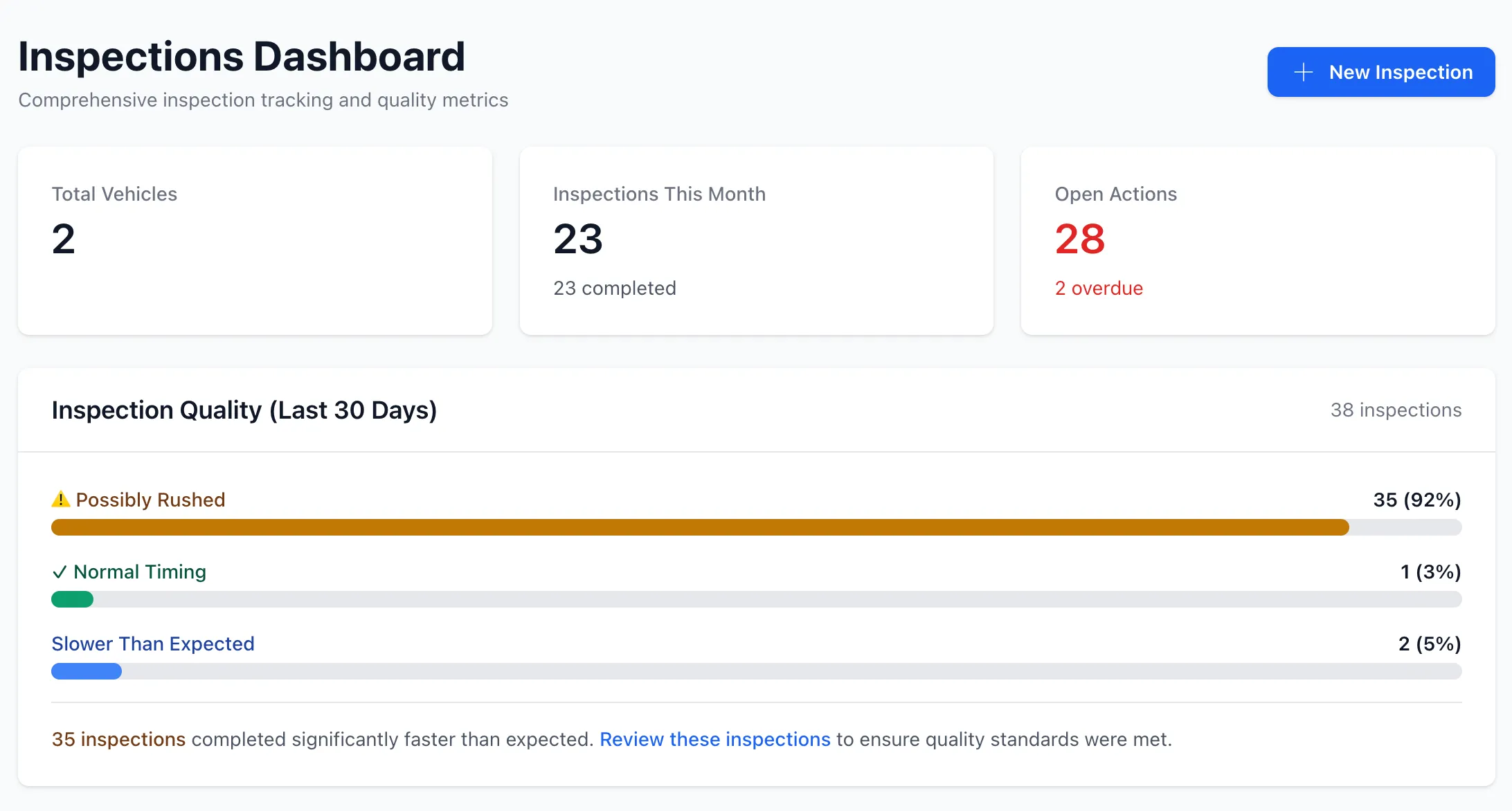
Overview
Section titled “Overview”Inspections in StationOne:
- Use customisable templates with multiple item types
- Auto-calculate pass/fail scores (80% threshold)
- Generate maintenance actions automatically
- Support photos, signatures, and detailed responses
- Track inspector and review status
- Integrate with inspection schedules
Inspection Types
Section titled “Inspection Types”By Asset Type
Section titled “By Asset Type”Vehicle Inspections
- Pre-shift daily checks
- Periodic maintenance inspections
- Equipment functionality tests
Equipment Inspections
- Tools and safety gear
- Vehicle-mounted equipment
- Standalone assets
Hydrant Inspections
- Simplified binary checks (see Hydrants)
- Public participation via hydrant runs
By Inspector Type
Section titled “By Inspector Type”Internal Inspections
- Conducted by authenticated brigade members
- Full user tracking and accountability
Public Inspections
- Conducted via QR code access
- Name entry for non-authenticated users
- Email notifications to admins
Inspection Workflow
Section titled “Inspection Workflow”1. Create Inspection
Section titled “1. Create Inspection”Select the vehicle or equipment and choose a template:
- From scheduled inspection (linked to schedule)
- Ad-hoc inspection (one-off check)
2. Conduct Inspection
Section titled “2. Conduct Inspection”Work through the checklist sections:
- Answer questions based on item type
- Capture photos where required
- Add signatures
- Save draft responses automatically
3. Complete Inspection
Section titled “3. Complete Inspection”Submit the final inspection:
- Timestamp recorded
- Score automatically calculated
- Actions auto-generated for failures
- Schedule updated (if scheduled inspection)
4. Review (Optional)
Section titled “4. Review (Optional)”Some inspections may require supervisor review:
- Pending review status
- Approve or reject with feedback
- Additional actions can be created
Inspection Item Types
Section titled “Inspection Item Types”Templates support various item types:
| Type | Description | Example |
|---|---|---|
| pass_fail | Binary pass/fail with optional comment | ”Brakes functional” |
| yes_no | Binary yes/no response | ”Fire extinguisher present” |
| present_missing | Binary presence check | ”First aid kit present” |
| quantity_with_expiry | Dual fields for quantity and expiry | ”Water in coolant: 50L, expires 2024-12-31” |
| expiry_date | Single expiry date (30-day warning) | “Fire extinguisher expiry” |
| photo | Photo capture | ”Engine compartment photo” |
| signature | Digital signature | ”Inspector signature” |
| slider | Numeric range (1-10) | “Tire tread depth” |
| text | Open text field | ”Additional notes” |
| number | Numeric input | ”Odometer reading” |
| date | Date picker | ”Last service date” |
Scoring & Pass/Fail
Section titled “Scoring & Pass/Fail”Inspections are automatically scored:
- Scorable items: Items that contribute to pass/fail (typically pass_fail, present_missing, yes_no)
- Pass threshold: 80% of scorable items must pass
- Calculation: passed_items / total_scorable_items × 100
- Result: Inspection marked PASS or FAIL
Automatic Action Generation
Section titled “Automatic Action Generation”Failed inspection items automatically create Actions:
- Failures: pass_fail items that fail
- Missing items: present_missing items marked missing
- Expired items: expiry_date items past threshold (30 days)
- Low quantity: quantity_with_expiry below expected quantity
Each action includes:
- Reference to inspection and specific item
- Section and item labels
- Status workflow (open → in_progress → resolved → closed)
- Assignment capability
Photo & Signature Attachments
Section titled “Photo & Signature Attachments”Inspections support rich media:
- Photos: Active Storage integration, tied to response keys
- Multiple photos: Can attach multiple photos per item
- Signatures: Digital signature capture stored as URL
- Retrieval: Photos accessible via
Inspection.photo_for(response_key)
Draft Saving
Section titled “Draft Saving”Inspections can be saved as drafts:
- Auto-save during inspection
- Resume later
- No scoring or action generation until completion
Inspection History
Section titled “Inspection History”All inspections are permanently stored:
- View past inspection results
- Compare scores over time
- Track trends and patterns
- Audit trail for compliance
Related Features
Section titled “Related Features”- Templates - Configure inspection checklists
- Inspection Schedules - Set up recurring inspections
- Actions - Manage maintenance tasks
- Vehicles - Vehicle inspection management
- Equipment - Equipment inspection management