Hydrant Management
The Hydrant Management system helps brigades track fire hydrants, schedule inspections, and organise maintenance runs with public participation options.
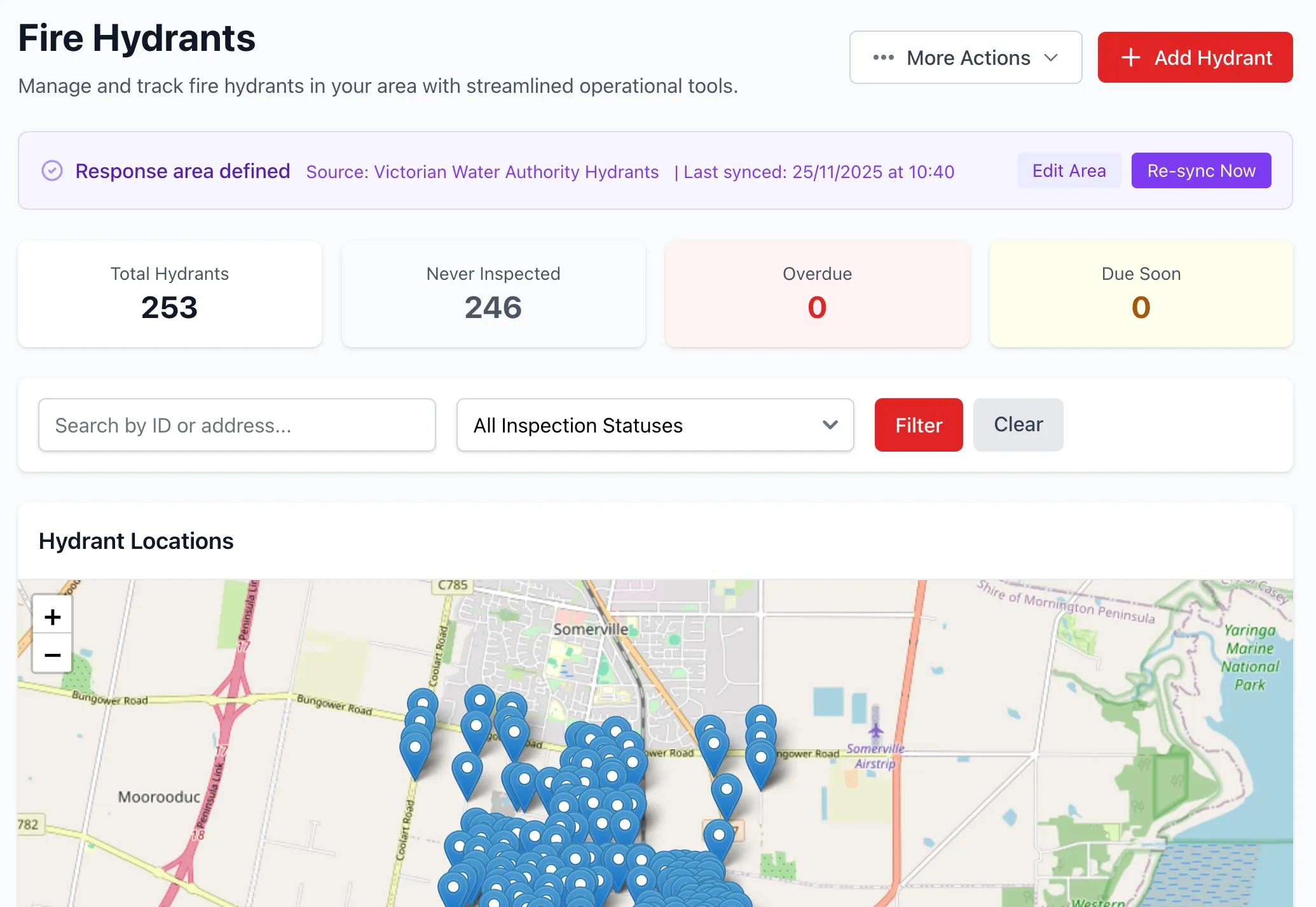
Overview
Section titled “Overview”Hydrant Management provides:
- A shared statewide hydrant pool, loaded automatically from external data sources and claimed by units within their response area
- Manual hydrant creation for anything outside the pool, with automatic de-duplication on claim
- Configurable inspection checklists — 7 default checks, with the ability to disable defaults and add unit-specific custom checks
- Fault reporting workflow: export failed inspections to your water authority and track which faults have been reported
- Operational use logging — pressure and timestamp records for any time a hydrant is actually used, independent of the inspection cycle
- Admin-reviewed location correction proposals from the field
- Hydrant runs for organised inspection routes
- Public access via QR codes for volunteer inspections
- 365-day inspection cycle tracking
Hydrant Records
Section titled “Hydrant Records”Each hydrant includes:
- Unique ID: Auto-generated, imported, or assigned on claim
- Location: GPS coordinates (latitude/longitude), with a flag once manually corrected
- Pipe Diameter: Optional; captured on the hydrant or filled in by an inspector the first time it’s missing
- Unit: Owning brigade, or unclaimed if still sitting in the statewide pool
- Inspection Tracking: Last inspection date and next due date
- Fault Status: Whether the hydrant’s most recent fault has been reported to the responsible authority
Hydrants can be created manually or arrive automatically via the statewide pool.
Statewide Hydrant Pool & Claiming
Section titled “Statewide Hydrant Pool & Claiming”Rather than each brigade syncing directly against an external API, StationOne maintains one shared pool of hydrants per data source:
- An organisation admin enables a Hydrant Data Source (e.g. CFA Hydrant Database, SA Water) once for the whole organisation
- StationOne loads and refreshes that source’s full statewide dataset into the pool on its own recurring schedule — new hydrants land unclaimed (
unit_idblank), existing ones have their source fields refreshed - A unit defines its Response Area (a GeoJSON polygon) and selects a data source, then claims any pool hydrants that fall inside its area — assigning them to the unit and generating a friendly, unit-scoped ID
- A pool hydrant that matches (within 10m) a hydrant the unit already created manually is merged into it instead of creating a duplicate
- Unclaimed and other-units’-claimed hydrants stay visible on the map (as grey and violet pins respectively) for organisation-wide coverage awareness, and can still be inspected or have operational use logged against them — see Unclaimed Hydrants
- A claimed hydrant that later disappears from the upstream feed is flagged, not deleted, since inspection history may exist against it
See Manage Hydrants for the full setup walkthrough.
Hydrant Inspections
Section titled “Hydrant Inspections”Hydrant inspections use a checklist system separate from vehicle inspection templates, and configurable per unit.
Inspection Checklist
Section titled “Inspection Checklist”StationOne ships with 7 default checks:
- Clear of debris
- Post present
- Reflector present
- Road reflector present (supports N/A)
- White road triangle present (supports N/A)
- Accessible
- Functional
Units can disable any default check that doesn’t apply to them and add their own custom checks (pass/fail, optional comment, optional N/A). The checklist actually used is snapshotted onto each inspection, so changing the configuration later never rewrites history. An inspection against an unclaimed pool hydrant uses the inspecting unit’s own checklist, since the hydrant has no owning unit to source one from.
Results are pass/fail with an optional comment field. A hydrant with no pipe diameter recorded yet prompts the inspector for one; entering it saves straight onto the hydrant record.
Location Correction Proposals
Section titled “Location Correction Proposals”If a hydrant isn’t where the map says it is, an inspector can flag a corrected location during an inspection. The correction doesn’t move the hydrant immediately — it’s queued for unit admin review (in-app notification and email), and the admin approves or rejects it from the hydrant’s detail page.
Fault Reporting
Section titled “Fault Reporting”A hydrant with a failed inspection can be exported (CSV or PDF) as part of a fault report to the responsible water authority, and marked as reported — shown with a spanner icon in the hydrant list. The flag clears automatically the next time the hydrant passes inspection, or can be cleared manually.
Operational Use
Section titled “Operational Use”Independent of the inspection cycle, any hydrant a crew actually draws water from — during an incident, training, or a flush — can have its pressure and a timestamp logged. This is available against any hydrant visible to the organisation, including ones claimed by another unit or still unclaimed.
Inspection Cycle
Section titled “Inspection Cycle”The system automatically tracks inspections on a 365-day cycle:
- Next due date calculated from last inspection
- Overdue hydrants flagged on dashboard
- Inspection status visible in lists and maps
Hydrant Runs
Section titled “Hydrant Runs”Hydrant Runs organise hydrants into ordered routes for efficient inspection campaigns.
Run Organisation
Section titled “Run Organisation”Runs provide:
- Named routes (e.g., “Downtown Route”, “Station 2 Area”)
- Ordered hydrant lists for sequential inspection
- Hydrant management (add, remove, reorder)
- Run-level public access controls
Adding Hydrants to Runs
Section titled “Adding Hydrants to Runs”Hydrants can be added to runs in three ways:
- Individual Selection: Pick specific hydrants from a list
- Polygon Selection: Draw an area on a map to bulk-add hydrants
- Manual Creation: Add hydrants directly during run creation
Public Access for Runs
Section titled “Public Access for Runs”Runs can be made publicly accessible for volunteer inspection events:
- Generate unique secure token
- Create QR code for printing
- Enable/disable public access per run
- Regenerate tokens to invalidate old codes
Station Portal Hydrant Display
Section titled “Station Portal Hydrant Display”Hydrants can be displayed on the Station Portal when enabled:
- Interactive map showing all unit hydrants
- Click markers for hydrant details
- Unit-level toggle for public visibility
- Integration with public page features
Search & Filtering
Section titled “Search & Filtering”Find hydrants using:
- Search by unique ID
- Filter by inspection status (never inspected, overdue, due soon) or fault-reported status
- Map view with GPS markers, colour-coded by inspection/fault/claim status
- List view with sortable columns
Note that the searchable list only covers hydrants claimed by your unit — unclaimed or other-units’-claimed hydrants are only visible via Map View.
Reporting
Section titled “Reporting”Track hydrant maintenance with reports:
- Inspection status overview
- Overdue hydrants list
- Inspection history per hydrant
- Run completion tracking
- Failed-inspection fault reports for the responsible authority
Integration Points
Section titled “Integration Points”Hydrant management integrates with:
- Public Access: QR codes for volunteer inspections and operational use logging
- Unit Settings: Response area and hydrant data source configuration
- Organisation Settings: Statewide hydrant data source management
- Dashboard: Overdue hydrant warnings
- Mapping: GPS coordinate display and claim-status colour coding
Permissions
Section titled “Permissions”Hydrant management operates with role-based permissions:
- View Hydrants: All unit members (unclaimed and own-unit hydrants; other units’ claimed hydrants are visible on the map only)
- Create/Edit Hydrants: Brigade administrators and above
- Configure Hydrant Data Sources: Organisation administrators
- Create Runs: Brigade administrators and above
- Conduct Inspections: All unit members
- Log Operational Use: All unit members, against any hydrant visible to the organisation
- Public Inspections & Use Logging: No authentication required (when enabled)
Related Features
Section titled “Related Features”- Manage Hydrants - Setup and admin how-to guide
- Inspect Hydrants - Runs and inspection how-to guide
- Public Access - QR code functionality for volunteer inspections