Training
The Training system allows brigades to schedule training sessions, track member attendance before and after sessions, and manage capacity for organised training activities.
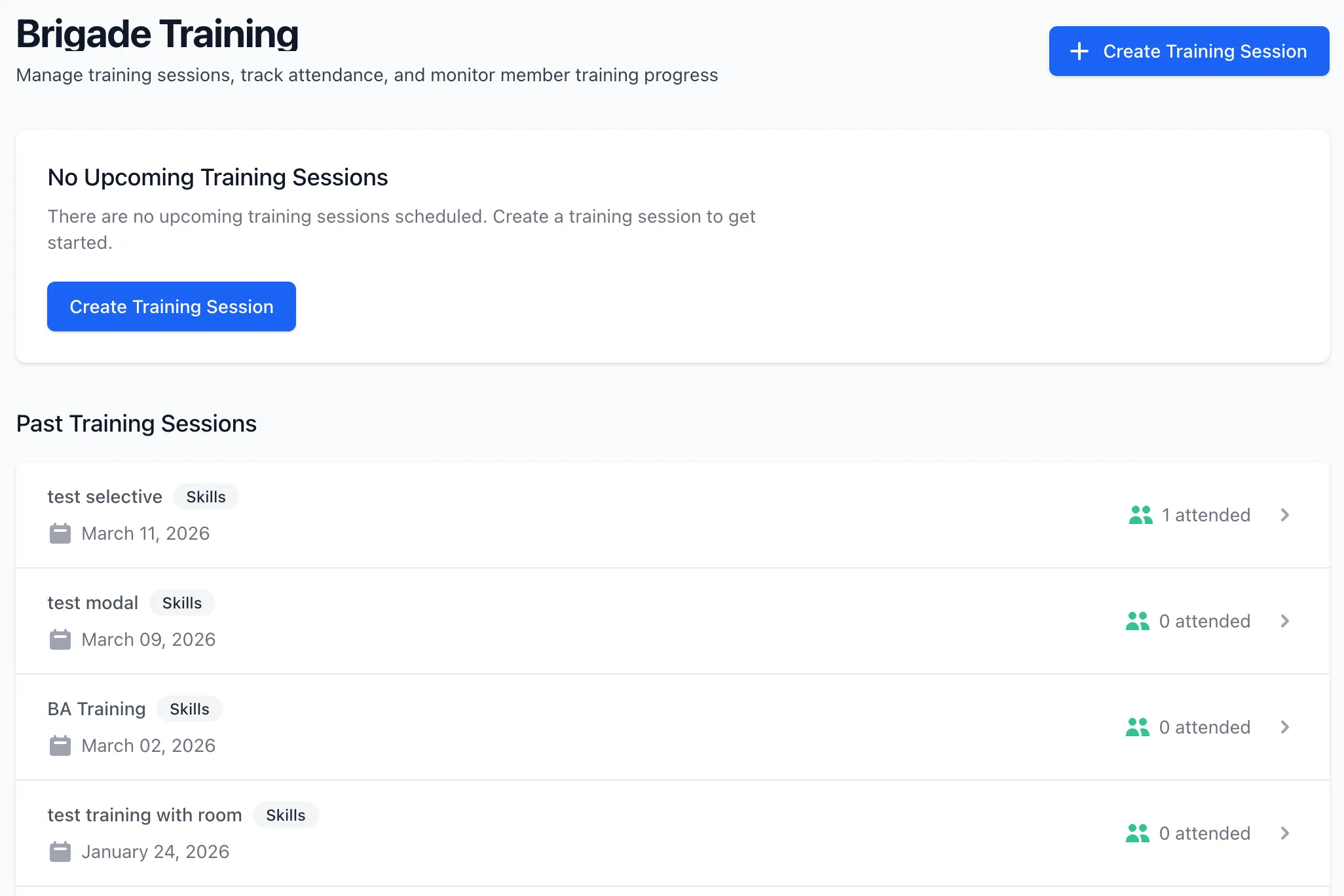
Overview
Section titled “Overview”Training in StationOne provides:
- Training session creation with dates, times, locations, and descriptions
- Training type categorisation (drill, skills, operational, fitness, safety, other)
- Mandatory training flagging for required sessions
- Attendance tracking with registration and post-training status (attended/absent)
- Capacity management with maximum participant limits
- Instructor assignment for session leadership
- Room booking integration with automatic reservations
- Email notifications with RSVP links
- Cancellation with automatic notifications to registered members
- Bulk attendance management for administrators
Training Properties
Section titled “Training Properties”Each training session includes:
- Basic Information: Title, description, location
- Schedule: Start date/time, end date/time
- Training Type: Category of training (drill, skills, operational, fitness, safety, other)
- Mandatory: Flag indicating whether attendance is required
- Instructor: Assigned instructor from unit members
- Room: Optional room assignment with automatic booking
- Capacity: Maximum number of participants (optional)
- Unit & Organisation: Training ownership and scope
Training Types
Section titled “Training Types”Training sessions can be categorised by type:
- Drill — Practical exercises and rehearsals
- Skills — Skills development and competency training
- Operational — Operational procedures and protocols
- Fitness — Physical fitness and conditioning
- Safety — Safety procedures and awareness
- Other — Any other training category
Attendance System
Section titled “Attendance System”Training attendance tracks members through two phases: pre-training registration and post-training participation.
Attendance Statuses
Section titled “Attendance Statuses”Registered
- Member is registered to attend the training session
- Default status when added via notification or manual registration
- Receives cancellation notification if training is deleted
Attended
- Member confirmed as having attended the session
- Set by administrators after training completes
- Contributes to attended count in training records
Absent
- Member did not attend despite being registered
- Set by administrators after training completes
- Contributes to absent count in training records
RSVP Tokens
Section titled “RSVP Tokens”Each training attendance record includes a unique RSVP token that allows:
- One-click registration directly from email
- Attendance updates without logging in
- Secure response tracking per member
Notification System
Section titled “Notification System”Training sessions support email notifications for member coordination.
Training Invitations
Section titled “Training Invitations”When creating a training session, you can:
- Send invitations immediately to all unit members
- Save the training without sending (send invitations later is not supported — invitations are sent at creation time only)
- Invitations include training details and RSVP links
Cancellation Notifications
Section titled “Cancellation Notifications”When a training session is deleted:
- Cancellation emails sent to all registered members
- Includes training details for reference
- Uses member’s stored email address
Capacity Management
Section titled “Capacity Management”Training sessions support optional capacity limits:
Setting Capacity
Section titled “Setting Capacity”- Max Participants: Optional field to limit attendance
- When set, the system tracks available spots
- Members see remaining capacity on the training details page
Capacity Behaviour
Section titled “Capacity Behaviour”- Members cannot register when the training is full
- A “Training Full” warning is displayed when capacity is reached
- Administrators can still register members beyond capacity
- Spots remaining calculated as: max participants minus total registered
Instructor Assignment
Section titled “Instructor Assignment”Training sessions can have an assigned instructor:
- Selected from unit members during creation
- Displayed on training details and list views
- Instructors can edit training sessions they are assigned to
- Used as calendar organiser for calendar exports
Room Booking Integration
Section titled “Room Booking Integration”Training sessions integrate with the room booking system:
Automatic Room Bookings
Section titled “Automatic Room Bookings”When a room is assigned to a training session:
- A room booking is automatically created
- The booking is pre-approved (bypasses approval workflow)
- Covers the training start to end time
- Purpose set to “Training: [Title]”
- Room availability updated immediately
Booking Synchronisation
Section titled “Booking Synchronisation”Room assignments stay synchronised:
- Changing rooms removes old booking and creates new one
- Updating training times updates the booking times
- Removing room assignment deletes the booking
- Deleting the training cancels the room booking
Mandatory Training
Section titled “Mandatory Training”Training sessions can be marked as mandatory:
- Mandatory Flag: Indicates attendance is required for all members
- Displayed as a badge on training listings
- Informational — helps brigade administrators identify required sessions
- Useful for compliance and regulatory training requirements
Training Lists
Section titled “Training Lists”Training sessions are organised into two categories:
Upcoming Training
Section titled “Upcoming Training”- Start time is in the future
- Ordered by start time (soonest first)
- Shows registration count and capacity
- Primary focus for planning and registration
Past Training
Section titled “Past Training”- End time is in the past
- Ordered by start time (most recent first)
- Limited to 10 most recent for quick reference
- Shows attended count for completed sessions
Training Timeline
Section titled “Training Timeline”Typical training session lifecycle:
- Creation: Administrator creates training session with details and room assignment
- Notification: Invitations sent to all unit members (if selected)
- Registration: Members register via email RSVP link or from training details page
- Capacity Tracking: Available spots decrease as members register
- Training Occurs: Session takes place at scheduled time and location
- Attendance Recording: Administrator marks members as attended or absent
- Post-Training: Training moves to past training list with attendance records
Permissions
Section titled “Permissions”Training management operates with role-based permissions:
- View Training: All unit members
- Create Training: Brigade administrators and above
- Edit Training: Training instructor or brigade administrators
- Delete Training: Brigade administrators and above
- Register Self: All unit members (for training sessions they can view)
- Manage Attendance: Brigade administrators and above
- Register Members: Brigade administrators and above
- Remove Attendance: Brigade administrators and above
- Bulk Register/Update: Brigade administrators and above
Calendar Integration
Section titled “Calendar Integration”Training sessions support calendar export:
- ICS file generation for calendar applications
- Includes training title, times, and location
- Instructor email used as calendar organiser
- Compatible with common calendar applications
Email Notifications
Section titled “Email Notifications”The system sends two types of training emails:
New Training Notification
Section titled “New Training Notification”- Sent when training is created with notifications enabled
- Includes full training details
- Contains RSVP registration link
- Respects user notification preferences for the training category
Cancellation Notification
Section titled “Cancellation Notification”- Sent when training is deleted
- Only sent to registered members
- Includes training details for reference
- Considered a critical notification
Related Features
Section titled “Related Features”- Events — Brigade event management
- Rooms — Room booking system
- Public Access — Public brigade page visibility