Breathing Apparatus Management
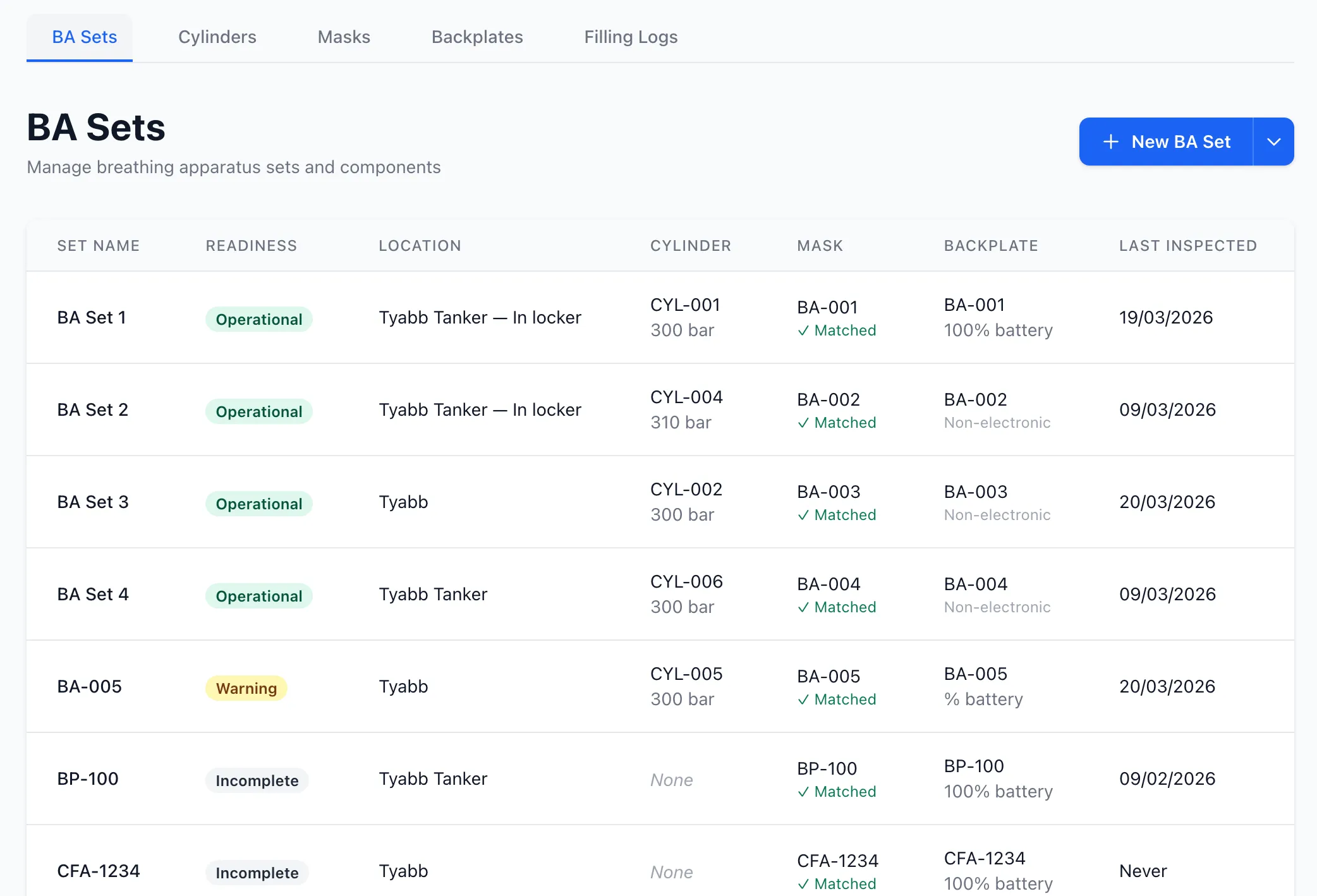
The Breathing Apparatus (BA) Management module provides complete lifecycle tracking for BA equipment, including sets, cylinders, masks, and backplates with automated inspection data capture and cylinder filling logs.
Overview
Section titled “Overview”Breathing Apparatus Management provides:
- BA Set Management: Complete BA sets with component tracking
- Cylinder Management: Air cylinder inventory with pressure monitoring and filling logs
- Mask Management: Face mask tracking with assignment and inspection history
- Backplate Management: Harness backplate tracking with electronic monitoring
- Inspection Integration: Automated data capture during inspections
- Filling Logs: Comprehensive cylinder filling and testing records
- Component Assignment: Flexible assignment to units, locations, sets, or vehicles
- Status Tracking: Monitor operational status and maintenance requirements
Key Features
Section titled “Key Features”Component Hierarchy
Section titled “Component Hierarchy”BA equipment follows a hierarchical structure:
BA Set (Complete breathing apparatus) ├── Cylinder (Air cylinder with pressure monitoring) ├── Mask (Face mask) └── Backplate (Harness with optional electronics)Each component can be:
- Assigned to a complete BA set
- Held as spare inventory
- Assigned to a specific location
- Assigned to a unit/brigade
- Assigned to an appliance (cylinders only)
Assignment Flexibility
Section titled “Assignment Flexibility”Components support multiple assignment types:
BA Set Assignment
- Component permanently assigned to a specific BA set
- All components tracked as a unit
- Ideal for dedicated sets
Unit/Brigade Assignment
- Component owned by a specific unit
- Available for use by that brigade
- Part of brigade inventory
Location Assignment
- Component stored at a specific location
- Repair facilities, workshops, or storage
- Away for maintenance tracking
Appliance Assignment (Cylinders Only)
- Spare cylinders carried on vehicles
- Quick access for operational use
- Tracked as vehicle equipment
Status Management
Section titled “Status Management”All components track operational status:
- On Set: Currently assigned to a BA set
- Spare: Available in inventory
- Away for Repair: Offsite for maintenance or testing
- Decommissioned: Retired from service
Inspection Integration
Section titled “Inspection Integration”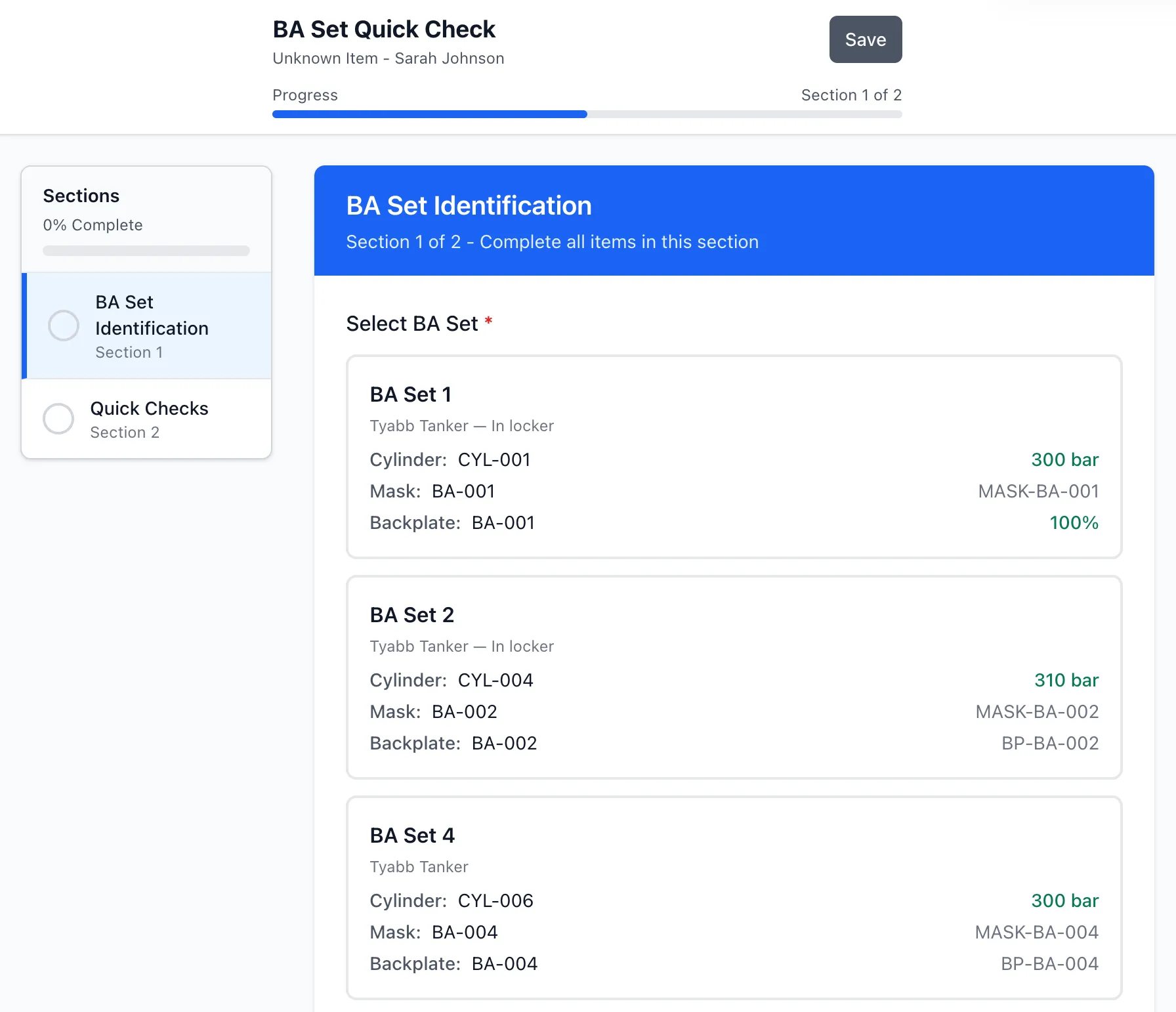
BA inspections automatically capture critical data:
Automatic Data Extraction
- Cylinder pressure readings
- Electronic backplate battery levels
- Component assignments and swaps
- Last inspection dates
- Operational status
Flexible Template System
- Build custom BA inspection procedures
- Three specialised BA item types for templates:
- BA Set Selector: Choose which set is being inspected
- BA Component Selector: Select/confirm specific components
- BA Set Position Check: Quick vehicle position verification
- System automatically finds and records core data
- No rigid template structure required
Vehicle Position Checks
- Quick verification of BA sets on appliances
- Shows last known components at each position
- Update components during vehicle inspections
- Track component swaps and movements
Cylinder Filling Management
Section titled “Cylinder Filling Management”Comprehensive filling and testing logs:
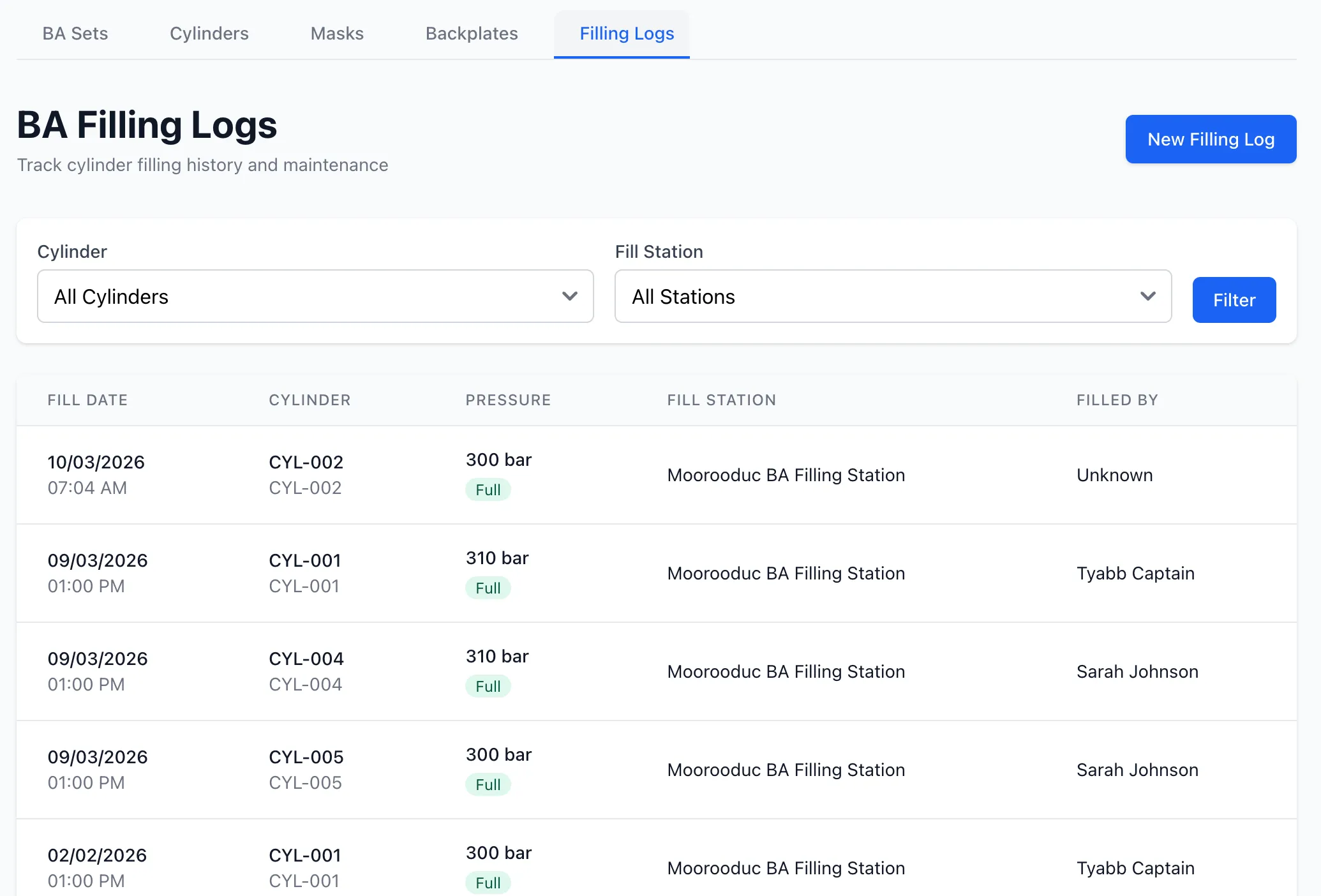
Fill Records
- Who filled the cylinder
- Fill date and time
- Pressure before and after
- Fill method (cascade, direct, partial)
- Notes and observations
Testing Integration
- Hydrostatic test tracking
- Test due dates and alerts
- Test results and certifications
- Compliance monitoring
Unit-Level Access Control
- Brigade-level scoping for filling logs
- Hierarchical visibility (groups see brigade logs)
- Organisation-wide reporting for administrators
BA Set Records
Section titled “BA Set Records”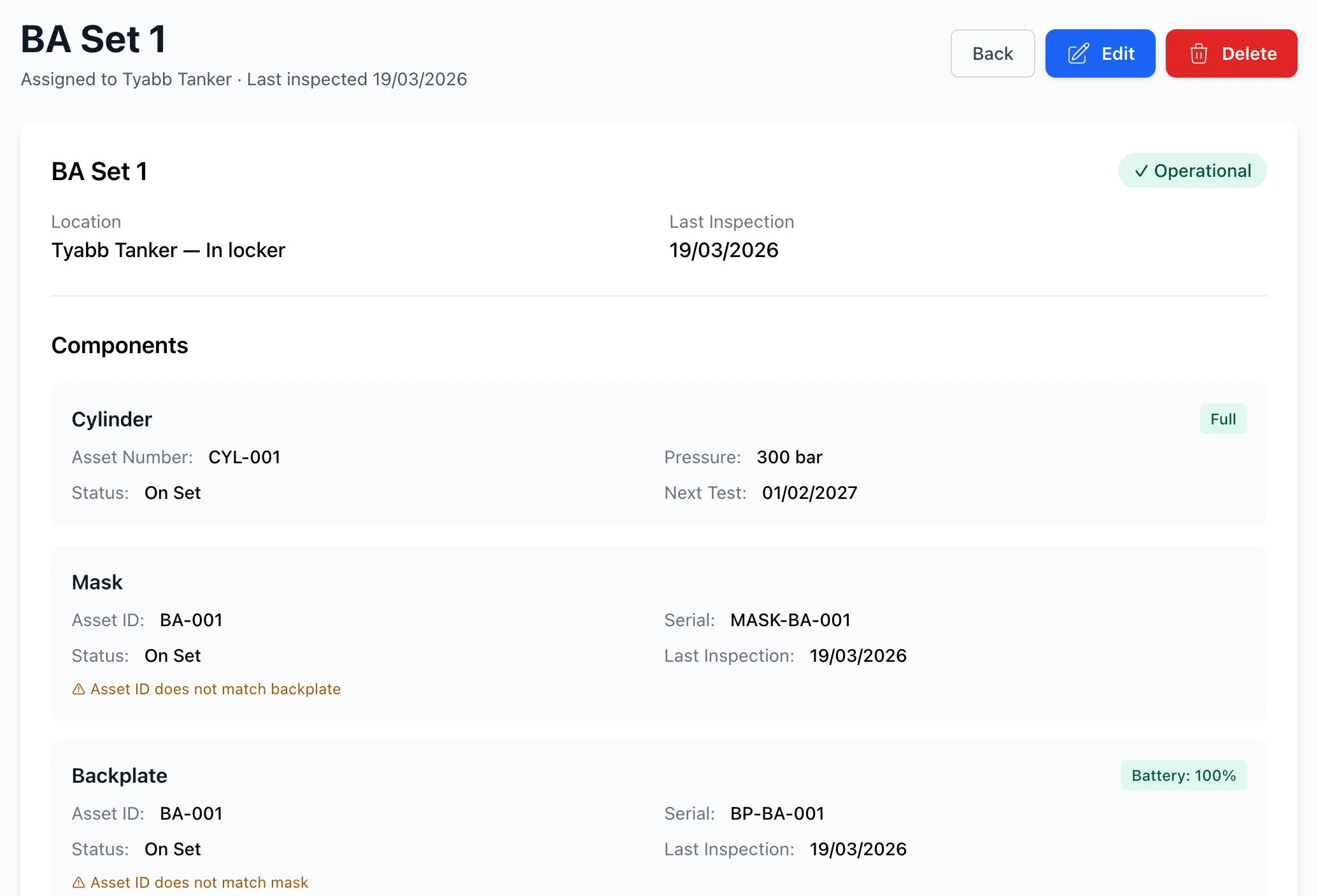
Each BA set includes:
- Set Name/Number: Unique identifier
- Asset ID: Internal tracking number
- Components: Assigned cylinder, mask, and backplate
- Assignment: Unit, location, or vehicle
- Status: On appliance, spare, away for repair
- Last Inspection: Most recent inspection date
- Inspection History: All inspections performed
- Component History: Track component changes over time
BA sets are the primary unit for:
- Operational deployment
- Inspection scheduling
- Component tracking
- Maintenance planning
Cylinder Records
Section titled “Cylinder Records”Each cylinder includes:
- Asset ID: Internal asset tracking number
- Serial Number: Manufacturer’s serial number
- Manufacturer: Cylinder manufacturer
- Working Pressure: Maximum rated pressure (bar)
- Current Pressure: Live pressure reading (auto-updated)
- Status: Operational status
- Hydrostatic Test Date: Last test date
- Next Test Due: Calculated due date
- Assignment: Set, unit, location, or appliance
- Filling Logs: Complete filling history
Pressure Monitoring
Section titled “Pressure Monitoring”Cylinder pressure automatically updates:
- During inspections with pressure readings
- When filling logs are recorded
- Shows current fill level
- Alerts for low pressure
- Ready/not ready indicators
Hydrostatic Testing
Section titled “Hydrostatic Testing”Track mandatory testing requirements:
- Test interval tracking (typically 5 years)
- Test due date alerts
- Test result recording
- Compliance reporting
- Out of service management
Mask Records
Section titled “Mask Records”Each mask includes:
- Asset ID: Internal asset tracking number
- Serial Number: Manufacturer’s serial number
- Manufacturer: Mask manufacturer
- Status: Operational status
- Last Inspection: Most recent inspection date
- Assignment: Set, unit, or location
- Inspection History: All inspections performed
Masks are critical safety components requiring:
- Regular inspection
- Proper fit testing
- Seal integrity checks
- Lens condition monitoring
- Speaking diaphragm checks
Backplate Records
Section titled “Backplate Records”Each backplate includes:
- Asset ID: Internal asset tracking number
- Serial Number: Manufacturer’s serial number
- Manufacturer: Backplate manufacturer
- Strap Condition: Harness strap status
- Electronic: Electronic monitoring equipped (yes/no)
- Battery Level: Current battery percentage (if electronic)
- Status: Operational status
- Last Inspection: Most recent inspection date
- Assignment: Set, unit, or location
Electronic Backplates
Section titled “Electronic Backplates”For backplates with electronic monitoring (PASS devices, telemetry):
- Battery level tracking (percentage)
- Battery updates during inspections
- Low battery alerts
- Charging requirement tracking
- Battery replacement history
Inspection Workflow
Section titled “Inspection Workflow”Direct BA Set Inspections
Section titled “Direct BA Set Inspections”- Select BA set from inventory
- Initiate inspection using BA template
- Template includes BA-specific item types:
- BA Set Selector (identifies which set)
- BA Component Selector (confirms/updates components)
- Standard checklist items (visual checks, function tests)
- System automatically captures:
- Cylinder pressure from any pressure field
- Battery level from any battery field
- Component assignments from selector fields
- Inspection completion date
- Complete inspection
- Data automatically updates component records
Vehicle Inspections with BA
Section titled “Vehicle Inspections with BA”For truck inspections that include multiple BA positions, each BA position must be organised in its own subsection. This grouping allows StationOne to correctly associate BA sets, cylinders, battery levels, and pressure readings with the specific position being inspected.
Template Structure Requirements:
Section: BA Equipment  Subsection: BA Position 1    - BA Set Selector (choose which set)    - Cylinder questions/selectors    - [Battery field appears automatically for electronic sets]
  Subsection: BA Position 2    - BA Set Selector (choose which set)    - Cylinder questions/selectors    - [Battery field appears automatically for electronic sets]
  Subsection: BA Position 3    - BA Set Selector (choose which set)    - Cylinder questions/selectors    - [Battery field appears automatically for electronic sets]
Inspection Workflow:
- Conduct vehicle inspection
- For each BA position subsection:
- Select the BA set at that position
- Select/confirm cylinder
- Battery field appears if set has electronic backplate
- Enter cylinder pressure
- Complete other checks
- System automatically:
- Groups data by subsection
- Updates each BA set independently
- Records pressure for each cylinder
- Updates battery level for each electronic backplate
- Records inspection dates on all components
- Detects component swaps
- Creates actions for mismatches
- Complete inspection
- All BA data automatically synchronised
Important: Without subsection grouping, StationOne cannot determine which cylinder pressure belongs to which BA set, or which battery level belongs to which backplate. Always use subsections when inspecting multiple BA sets in a single template.
Public Inspections
Section titled “Public Inspections”BA inspections support public access:
- QR code access for external inspectors
- No login required
- Same automatic data capture
- Conducted by name instead of user account
- Full inspection history preserved
Cylinder Filling Workflow
Section titled “Cylinder Filling Workflow”Recording a Fill
Section titled “Recording a Fill”- Navigate to cylinder record
- Click “Log Fill” button
- Enter fill details:
- Pressure before fill (if partial)
- Pressure after fill
- Fill method (cascade/direct/partial)
- Notes (optional)
- Save filling log
- System automatically:
- Updates cylinder current pressure
- Records fill date and time
- Tracks who performed the fill
- Adds to filling history
Filling Methods
Section titled “Filling Methods”Cascade Fill
- Most common method
- Multiple cylinders in cascade system
- Efficient pressure transfer
- Standard procedure
Direct Fill
- Direct connection to compressor
- Single cylinder filling
- Higher air consumption
- Used when cascade unavailable
Partial Fill
- Topping up partially empty cylinder
- Records before and after pressure
- Maintains operational readiness
- Common for routine maintenance
Filling Log Reports
Section titled “Filling Log Reports”View filling activity:
- Brigade-level filling logs
- Filter by date range
- Filter by cylinder
- Filter by user
- Export to CSV for analysis
Assignment Management
Section titled “Assignment Management”Assigning Components to BA Sets
Section titled “Assigning Components to BA Sets”- Navigate to BA set
- Click “Edit Set”
- Select components:
- Choose cylinder from dropdown
- Choose mask from dropdown
- Choose backplate from dropdown
- Save changes
- Component status updates to “On Set”
Assigning Components to Units
Section titled “Assigning Components to Units”- Navigate to component (cylinder/mask/backplate)
- Click “Edit”
- Select assignment type: “Unit/Brigade”
- Choose unit from dropdown
- Save changes
- Component appears in unit inventory
Assigning Components to Locations
Section titled “Assigning Components to Locations”- Navigate to component
- Click “Edit”
- Select assignment type: “Location”
- Choose location (workshop, repair facility)
- Save changes
- Component tracked at that location
Assigning Cylinders to Appliances
Section titled “Assigning Cylinders to Appliances”- Navigate to cylinder
- Click “Edit”
- Select assignment type: “Appliance”
- Choose vehicle
- Save changes
- Cylinder tracked as vehicle equipment
Out of Service Management
Section titled “Out of Service Management”When components require maintenance:
Inspection Failures
- Failed inspection items generate actions
- Component can be marked out of service
- Recorded in component status
- Removed from available inventory
- Tracked until repair completed
Away for Repair
- Set component status to “Away for Repair”
- Assign to repair facility location
- Track time offsite
- Expected return date (optional)
- Return and reinstate when repaired
Decommissioning
- Set status to “Decommissioned”
- Removed from active inventory
- Inspection history preserved
- Cannot be assigned or used
- Retained for records
Compliance & Reporting
Section titled “Compliance & Reporting”Inspection Compliance
Section titled “Inspection Compliance”Track inspection status:
- Overdue inspections by component
- Due soon alerts
- Last inspection date for all components
- Inspection coverage rates
- Compliance reporting
Testing Compliance
Section titled “Testing Compliance”Monitor mandatory testing:
- Cylinders approaching hydrostatic test due dates
- Overdue test alerts
- Test completion tracking
- Certification records
- Regulatory compliance reports
Inventory Reporting
Section titled “Inventory Reporting”Generate inventory reports:
- All components by type
- Components by status
- Components by location
- Components by unit
- Complete BA sets ready for deployment
- Spare component availability
- Components requiring maintenance
Filling Activity
Section titled “Filling Activity”Analyse filling operations:
- Fills per cylinder (usage tracking)
- Average fill pressure
- Fill frequency analysis
- Identify problem cylinders
- Maintenance scheduling insights
Best Practices
Section titled “Best Practices”Component Management
Section titled “Component Management”- Maintain accurate serial numbers for all components
- Use consistent asset ID naming conventions
- Regularly audit component assignments
- Keep manufacturer information updated
- Document component issues thoroughly
BA Set Configuration
Section titled “BA Set Configuration”- Build complete sets for operational deployment
- Maintain adequate spare component inventory
- Track component compatibility
- Document set configurations
- Review set assignments regularly
Inspection Scheduling
Section titled “Inspection Scheduling”- Schedule regular BA set inspections
- Coordinate with operational schedules
- Prioritise overdue inspections
- Use template-based consistency
- Review inspection outcomes
Cylinder Management
Section titled “Cylinder Management”- Monitor pressure levels regularly
- Maintain filling logs for all cylinders
- Track hydrostatic test due dates
- Rotate cylinders in service
- Plan for test scheduling
Electronic Components
Section titled “Electronic Components”- Monitor battery levels in electronic backplates
- Establish battery replacement schedule
- Test electronic functions regularly
- Maintain spare batteries
- Document electronic issues
Maintenance Planning
Section titled “Maintenance Planning”- Address inspection failures promptly
- Track components away for repair
- Plan for component lifecycles
- Budget for replacements and testing
- Maintain repair facility relationships
Related Features
Section titled “Related Features”- Inspections - BA inspection system
- Templates - Create BA inspection checklists
- Equipment - General equipment tracking
- Vehicles - Appliance with BA positions
- Actions - Track BA maintenance tasks
- How to Use BA Cylinder QR Codes - Print and scan cylinder QR labels