Pre-Plans
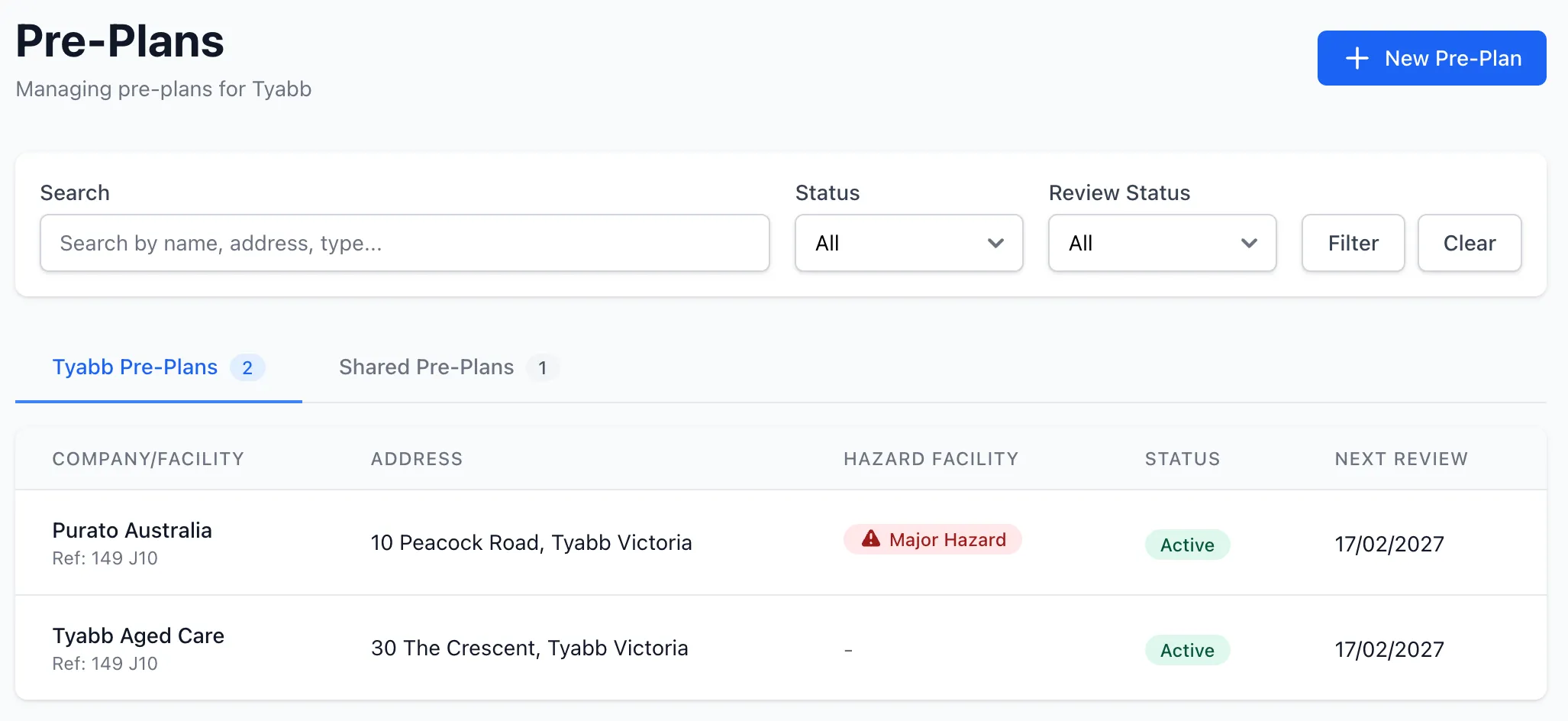
Pre-Plans allow brigades to build detailed emergency pre-incident plans for buildings and sites within their response area. These plans capture critical information that crews need when responding to an incident, including building details, hazardous materials, service isolation points, emergency contacts, and interactive site maps.
Overview
Section titled “Overview”The Pre-Plans module allows you to:
- Create detailed pre-incident plans for buildings and sites
- Record building dimensions, construction materials, and occupancy details
- Track hazardous materials with UN classification data
- Map key site features (hydrants, isolation points, exits) on an interactive map
- Attach site photos, floor plans, and fire service plans
- Manage annual review cycles with automated reminders
- Allow premises contacts to propose updates via secure token-based access
- Share pre-plans with other units in your organisation
- Publish pre-plans to your Station Portal for crew access in the field
Key Features
Section titled “Key Features”Site Information
Section titled “Site Information”Each pre-plan captures comprehensive site data:
- Company and address — Facility name, street address, and GPS coordinates
- Type of premises — Classification of the building or site
- Map reference — Melway or other map grid reference
- Response area — Brigade response area code
- Occupancy — Number of occupants and hours of operation
- Emergency contacts — Primary and secondary contact details
Building Information
Section titled “Building Information”Record detailed building data including:
- Building name and dimensions (length, width, height in metres)
- Construction materials
- Assembly area locations
- Plant room information
- Support for multiple buildings per site
Hazardous Materials
Section titled “Hazardous Materials”Track dangerous goods stored on site:
- UN number and proper shipping name
- Hazard class and packing group
- Quantity and storage location
- Links to the national dangerous goods database
- Custom hazard entries for unlisted materials
Service Isolation Points
Section titled “Service Isolation Points”Document the location of critical service shutoff points:
- Electricity isolation
- Gas shutoff
- Water shutoff
- Solar disconnect
Interactive Map
Section titled “Interactive Map”Plot key site features on a satellite map using markers and zones:
- Markers — Hydrants, boosters, gas isolation, electrical isolation, FIP, water meter, emergency exits, entry points, assembly points, hazmat storage, key access, plant rooms, and custom markers
- Zones — Draw polygons for hazmat storage areas, exclusion zones, assembly areas, building outlines, and custom zones
- Drag-and-drop marker repositioning
- Address geocoding with autocomplete
- Print-ready static map generation
Photos and Attachments
Section titled “Photos and Attachments”Attach supporting files to pre-plans:
- Site photos — Upload images with descriptions for a photo gallery
- Floor plans — PDF or image uploads of building layouts
- Fire service plans — PDF or image uploads of emergency response plans
- File size display and type detection
- Source tracking (brigade or premises contact uploads)
Annual Review Cycle
Section titled “Annual Review Cycle”Pre-plans follow a 12-month review cycle:
- Current — Recently reviewed and up to date
- Review due — Approaching or at review date
- Overdue — Past review date by more than 30 days
- Automated email reminders to brigade admins
- Review snapshots for historical comparison
- Reviewer name and notes recorded
Premises Contact Review
Section titled “Premises Contact Review”Allow site contacts to propose updates without needing a StationOne account:
- Brigade sends a review request email with a secure 30-day token
- Contact details and hours of operation are updated immediately
- Changes to hazards, alarm codes, and service isolation require brigade approval
- Brigade admins are notified of submitted changes
- Approve or reject workflow with notification emails to the site contact
Unit Sharing
Section titled “Unit Sharing”Share pre-plans across units within your organisation:
- Organisation admins can share pre-plans with any unit
- Shared pre-plans appear in a dedicated “Shared Pre-Plans” section
- Origin unit badge shows where the pre-plan came from
- Prevents duplicate entries across brigades
Station Portal
Section titled “Station Portal”Publish pre-plans to your Station Portal for field access:
- View site information, building details, and hazardous materials
- Interactive satellite map with annotations and legend
- Photo gallery and document downloads
- “Email Full Report” feature sends sensitive data (alarm codes, key details, contacts) via a secure time-limited link
- Sensitive information is hidden from the public view by default
Security
Section titled “Security”Pre-plans include sensitive site information that is protected:
- Alarm codes are encrypted at rest in the database
- Key details and contacts are excluded from public views
- Full access requires authenticated email verification
- Public update tokens expire after 30 days
- Time-limited access links for emailed reports
Related Features
Section titled “Related Features”- Public Access — Learn about Station Portals and QR code access
- Hydrants — Manage water supply infrastructure in your response area